THE SYSTEMS CENTER
One Structure, Every Tool
Systemscenter puts the system-level logical structure where it belongs — inside PLM. Teamcenter masters one common logical schematic structure; Capital Systems Architect, Systems Modeler, Logic Designer, NX Schematic Designer and MADe read and write it. Everything claimed on this site was proven on real installations — Capital 2512, Teamcenter 2506, NX 2606 and 2512, MADe 3.9.1 — between 3 July and 1 August 2026.
The problem: the system lives everywhere and nowhere
Modern platforms are designed in parallel by domains that barely share a file format. Functions and their information flows are authored in SysML (Cameo). The E/E architecture — LRUs, allocations, carriers — is authored in Capital Systems Architect. Detailed logic schematics are generated and refined in Capital Logic Designer. Fuel and hydraulic systems are drawn in NX. Software lives in its own world. Each tool masters its domain well, and none of them masters the whole.
The whole is the problem. No authoring tool in the stack even has a place to put the system tree: Capital's platform design is deliberately flat (the project format's cluster element cannot nest — Capital is a connectivity tool, not a structure tool), NX organizes by part and assembly, and the SysML model has the tree but no product configuration behind it. So the one artifact that says this boost pump belongs to the fuel system, feeds from that breaker panel, runs firmware, and exists only from unit 151 onward traditionally lives nowhere — it is reconstructed after the fact in slideware and spreadsheets.
PLM sees fragments, late: released drawings and BOM extracts, delivered after the cross-domain decisions were already made. The consequences are familiar. A fuel engineer adds a pump and the electrical team discovers its power demand at integration. A requirement changes and nobody can enumerate which devices it actually touches. Three tools each hold "the pump" — as three unrelated objects.
The thesis: master the structure in PLM, let every tool write it
Systemscenter is built on a single decision: there is one common logical schematic structure, it lives in Teamcenter as a configuration-managed Logical BOM, and every upfront design tool both reads it and writes it — live, during design, not at release. We call it the systems center: each domain tool keeps mastering what it is good at, and publishes its slice into the shared structure the moment it is saved.
A small neutral hub sits between the tools and Teamcenter. Tools exchange a versioned JSON bundle (contract v1.2 — components, functions, allocations, networks, signals, connections, requirement links); the hub merges each publish into a per-project head, keeps append-only revision history, and pushes the result into real Teamcenter types as one nested Logical BOM. Two hub semantics carry most of the weight: merge-preserve (a re-publish can never strip enrichment the publishing tool didn't send) and auto-enrichment (provenance is derived from the publishing tool, effectivity is inherited from the change wave, identity falls back to the tool's native id). A publishing tool only ever needs to supply one thing for a new element: its parent.
For air vehicles, the shared parent hierarchy is the MIL-STD-1808 spine — the chapter addresses (24 Electrical Power, 28 Fuel, 28 10 Storage…) become the cross-tool address and join key. The system architect owns the spine from SysML; each domain hangs its elements under the right chapter node. Every element also remembers who authored it, in which tool: sysml sysml-add elec elec-add fuel-add — and the Systemscenter views color by it.
One more rule keeps the model honest: a multi-domain device — a pump that is fluid equipment, electrically powered, and runs firmware — is one element with one identity, never duplicated per domain. The hub derives its participation set (domains[]) automatically from evidence: the connections that touch it and the software functions allocated to it. Duplication would fork effectivity, structure placement, and publish-back identity; a derived set costs the engineer nothing.
The ownership rule of thumb that every integration decision follows: SysML owns the problem (functions and their flows), Capital owns the solution (LRUs, allocations, carriers, wiring), Teamcenter owns the configuration (requirements, revisions, and the record of the mapping between the two).
What exists today — proven, not planned
All three Capital upfront tools are bi-directional today. Systems Architect publishes the platform design (components, allocations, carriers, derived connections) and materializes Teamcenter-authored architectures back into real Capital projects. Systems Modeler round-trips the functional layer — a design authored in Teamcenter, materialized in Capital, and re-published resolved every original Teamcenter identity: zero items created. Logic Designer publishes devices, connectors, and nets with regeneration-proof ids, nesting each device under the platform component it realizes — so functional, platform, and logic detail share one Teamcenter LBOM. The scale proof is the Wildfire round trip: 12 components, 40 functions, 38 signals, 40 allocations authored in Teamcenter, materialized into Capital, published back — 0 items created, 0 errors, everything resolved as existing.
The NX fluid leg closes the fourth column: an NX Diagramming (Piping) schematic is read headless through NXOpen, lands in the hub as FUEL/HYDRAULIC-domain components and connections, and nests into the same LBOM. In the reverse direction, a spine-slice endpoint lets the fuel engineer see the architect's structure — chapter addresses and "add fuel equipment here" cues — from inside NX, with no managed connection required.
On top of the structure runs the requirements thread, end to end: REQ-000123 ("sustain 5 minutes of inverted flight at full power", effective unit ≥151) is a real Teamcenter Requirement item related to the 7 functions it drives (satisfies) and the 2 architecture elements derived from it (derives); the functions are allocated to logical elements; the domain designs nest beneath them. Every hop in the customer's 13-step Platform Schematic scenario that is in integration scope runs live — 9 of the 13 steps proven on screen; the rest (PCB, software BOM, simulation) are narrated by design, outside this slice.
The engineer's experience of all this machinery is deliberately small:
Home ribbon → Component → two clicks on the Capital canvas. Normal authoring, nothing new.
One decision: where the element lives in the shared structure. Either the TC_PARENT_ID Quick-Access-Panel dropdown, or Assign Structure Parent… — a live tree of the Teamcenter spine with names and 1808 addresses, multi-select supported.
Right-click canvas → Custom → Publish to Teamcenter…. Provenance, effectivity, and identity are stamped automatically by the hub; seconds later the element sits nested in the common LBOM, visible to every other domain.
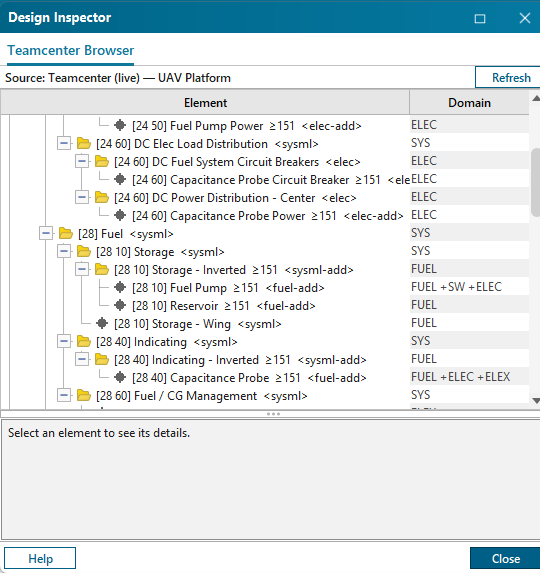
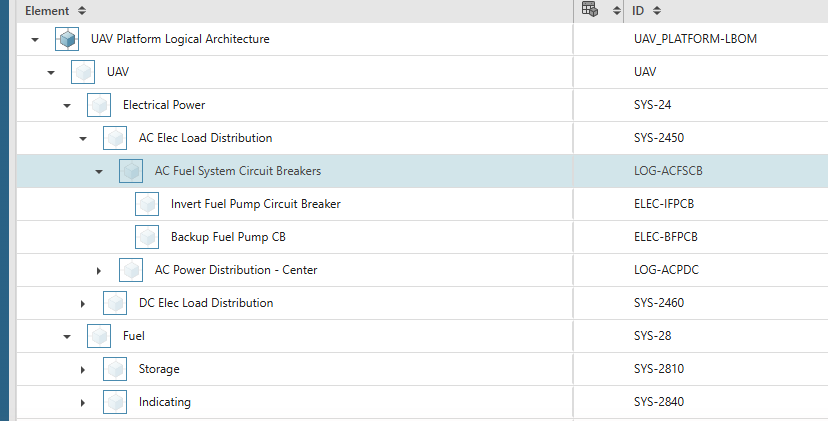
FUEL +SW +ELEC) on multi-domain elements.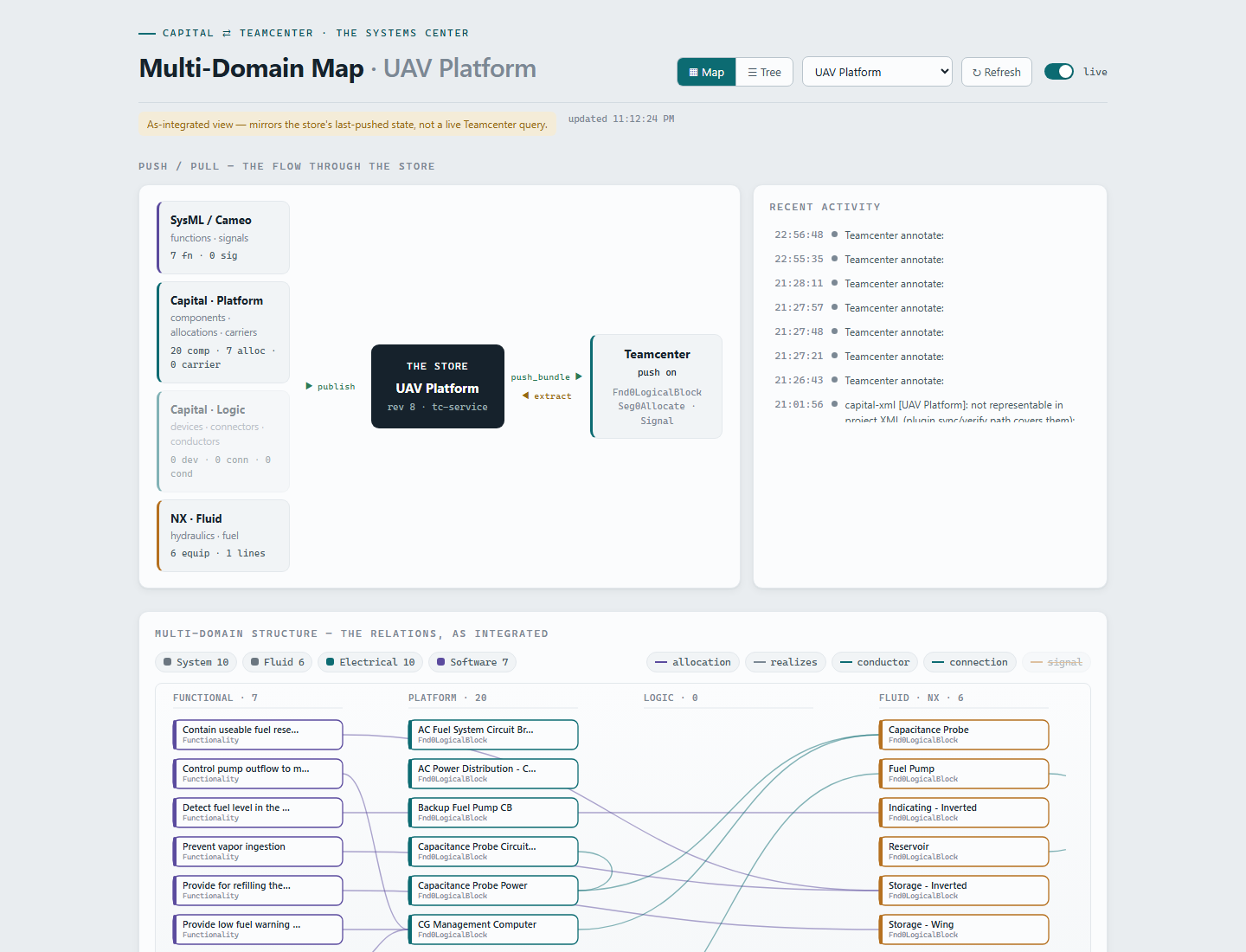
What a new element actually carries on the wire is one small record — the parent is the engineer's decision, the rest is derived:
{
  "id": "ELEC-BFPCB",
  "name": "Backup Fuel Pump CB",
  "type": "ECU",
  "domain": "ELECTRICAL",
  "parentId": "LOG-ACFSCB",          // the engineer's one decision
  "provenance": "elec-add",          // derived by the hub from the publishing tool
  "effectivity": "unit>=151",        // inherited from the change wave
  "attributes": { "milStd1808": "24 50" }
}Capability matrix
| Capability | Status | Notes |
|---|---|---|
| Platform publish (SA → Teamcenter) | proven live | Publish to Teamcenter… walks the open platform design into a v1.2 bundle; the hub pushes a nested LBOM. Idempotent at scale: Wildfire re-publish finished 0 created / 134 existing / 0 errors. |
| Functional publish (Systems Modeler / functional designs) | proven live | A TC-authored functional design, materialized in Capital and re-published, resolved every original Teamcenter identity — 0 created, 16 existing. Round trip closed. |
| Logic publish (Logic Designer) | proven live | Devices, connectors, and nets publish with stable derived ids; devices nest under their platform components; seg0Kind (LogicDevice / LogicConnector) stamped at creation. Regenerate + republish updates — never duplicates. |
| TC → Capital materialization (incl. logic designs) | partial | Functional + platform materialization proven at Wildfire scale — extraction was semantically lossless (0 diffs vs. the authored seed). Logic designs materialize as a real <logicaldesign>, validated against Capital's own DTD; the final in-Capital import check is pending. |
| Browser panels in all 3 tools + Design Inspector | proven live | Teamcenter Browser as a Design Tree tab and Design Inspector panel across SA, Systems Modeler, and Logic Designer; follows the open project automatically (tc.project=auto). |
| Requirements traceability | proven live | REQ-000123 is a real Requirement item, related revision-level to 7 functions (satisfies) and 2 architecture elements (derives). Requirements connect by relation only — the LBOM stays pristine. |
| Multi-domain Domain column | proven live | The hub derives domains[] on every import from primary ∪ declared ∪ evidence (connection kinds, software allocations). The fuel pump reads FUEL +SW +ELEC — one element, filtered into three domain views. |
| Stable, regeneration-proof identity | proven live | Stamped TC_ID / Element ID win; otherwise deterministic keys (device = source component + -DEV, owner-qualified connectors, name-keyed nets). The store guard dedups and migrates references when ids change. |
| MIL-STD-1808 nested LBOM | proven live | components[].parentId resolves within the push, then live in Teamcenter — the UAV spine materialized with 15 nested parents, 0 errors. Unresolvable parents fall back to the root visibly, never silently mis-nested. |
| NX fluid publish | proven live | NX Diagramming (Piping) schematics read headless via NXOpen → bundle (FUEL/HYDRAULIC) → hub → Teamcenter, nesting into the shared structure. Reverse "see the structure" ships as the spine-slice consumer; native Run Navigator = managed-mode track. |
| Systemscenter live views | proven live | Map + Tree lenses over the neutral bundle: provenance colors, 1808 badges, effectivity pills, domain filter, 4-second live refresh. Already ported into Active Workspace's SWF framework and building offline. |
How to read these docs
If you are here for the newest work — NX Diagramming, the MADe reliability branch, and the Teamcenter-to-Capital forward transform — read the four pages in The forward transform group in order. One Read, Four Tools explains the whole idea from scratch with nothing assumed. The Inverted Flight Fuel System is the single model everything is demonstrated on, shown in every tool. Then NX Diagramming, Capital and MADe go branch by branch, and Done, and Not Done is the punch list.
The rest of the wiki covers the bi-directional Capital hub, and descends into its mechanics. If you own strategy, read the problem, the thesis, and the capability matrix above — then skim the demo scenario page to see the thread run end to end. If you integrate, start with the exchange contract page (the neutral bundle v1.2, hub merge-preserve and enrichment semantics, and the exact Teamcenter type mapping), then the Capital authoring operations page (the three-step engineer workflow, parent pickers, identity and baseids, pick-list refresh), the MIL-STD-1808 roll-up design page (the spine, canonical ids, and cross-publish parent resolution), and the NX fluid leg page (unmanaged bridge today, managed connection track). The demo dry-run page maps all 13 scenario steps to proven actions with the pre-flight checklist, and the open items page is the honest punch list — engineer tasks, admin tasks, and the known gaps we called out above. Every hard-won gotcha we hit — silent cluster drops on property-name collisions, silent no-op property updates on the 2506 gateway, plugin hot-reload limits — is recorded on the page where it bites.