RUNNING IT
Operations, Behaviors & Failure Modes
The honest engineering appendix. Every behavior on this page — several of them silent — was hit, diagnosed, and re-verified live on Capital 2512 + Teamcenter 2506. This is what decides whether a publish lands nested in the common structure or vanishes without an error.
Who masters what
Every integration decision — import vs. verify, overwrite vs. revision, publish direction — follows from one table: which tool is the source of truth for each element type. The rule of thumb: SysML owns the problem (what the system does), Capital owns the solution (what implements it), NX owns the fluid domains, and Teamcenter owns the configuration (requirements, revisions, and the record of the mapping). The hub enforces the consequence: the functional design inside Capital is a hosted read-only copy of SysML data, while the platform/LRU side is Capital's to edit and publish back.
| Element | Source of truth | Flows via | Notes |
|---|---|---|---|
| Functions + hierarchy | SysML (Cameo / CATIA Magic) | functions[] / project-XML function | SysML Element ID GUID (or TC id) is the join key |
| Function ports (pins) | SysML | project-XML funcpin | Derived from SysML flows / proxy ports |
| Functional signals / nets | SysML | signals[] / funccond | Incl. performance attributes (bitsize, frequency, latency) |
| External interface boundary | SysML | project-XML sharedconductor | Design inputs / outputs |
| Requirements + trace links | Teamcenter (or Polarion via TC) | requirementLinks[] | Neither authoring tool masters these; both consume |
| LRUs / components / ECUs | Capital (platform design) | published back as components[] | Never present in SysML-side exports |
| Block / platform connectivity | Capital | connections[] | Component-to-component edges |
| Function → LRU allocations | Capital SA | allocations[] | The core SA decision; Teamcenter records it |
| Networks / carriers + signal-to-carrier | Capital SA | networks[], signals[].networkId | Protocol, baud, bus load |
| Logic devices / connectors (detail) | Capital Logic (generated from the platform design) | components[] type DEVICE/CONNECTOR | Nest under their platform component — functional + platform + logic share one LBOM |
| Fluid equipment & lines | NX Diagramming (Piping) | components[] domain FUEL/HYDRAULIC + connections[] | Read via NXOpen from the live session; rolls into the same LBOM root |
| Harness / wiring geometry | Capital (Harness tools) | stays in Capital | Physical implementation; TC gets released artifacts |
| Diagrams / layout (all domains) | Owning tool, regenerable | never exchanged | Layout is presentation, not data — regenerate after sync |
Provenance rides every element as TC_PROVENANCE and colors every view: sysml sysml-add elec elec-add fuel-add. Publishers never need to send it — the hub derives it from meta.source for new elements and merge-preserves it forever after.
Identity & revisions in Capital
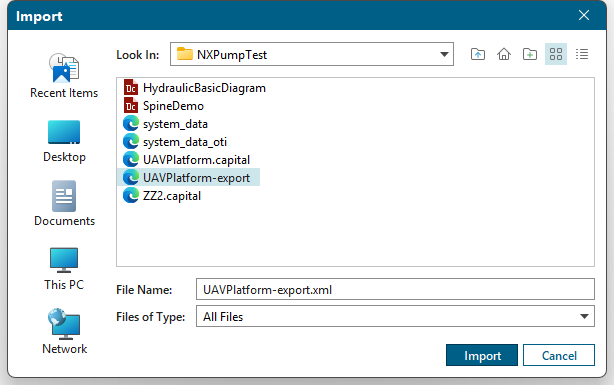
Capital re-keys baseids at bootstrap: the first import of a generated project XML creates the project with Capital-internal baseids, and the deterministic TCX… ids the hub stamped into the file are not retained. Only the Element ID properties survive — which is exactly why we stamp TC identity into properties, never into structural ids. To make later imports merge into the same project instead of prompting Duplicate Project Name, we harvest the real baseids once:
PM → File → Export → Select Project… — write the XML anywhere.
project@baseid, functiondesign@baseid, platformtopologydesign@baseid.
tc-service config.json under capitalBaseids.<project>. The generator stamps them into every future export.
"capitalBaseids": {
  "UAV Platform": { "project": "UID…", "design": "UID…", "platform": "UID…" }
}
With baseids configured, importing a regenerated XML opens the Import Designs to Project dialog against the existing project with two modes. Copy As Revision (the default) adds design revision B/C/… and leaves existing revisions untouched — safe, and the mode we use for TC-mastered updates. Overwrite converges the design exactly to the XML — adds, renames, deletes; object UIDs churn and diagram graphics may need regeneration. Reserve it for deliberate TC-mastered resets.
TC_PARENT_ID pick-list at its old values even when the XML carries a newer one. Overwrite-mode refresh is untested. See the limitations table below for the refresh options.Read-side identity follows the same discipline. The Teamcenter Browser panel and all three publishers resolve stamped TC identity first: the design's TC_ID property, then Element ID, then the Capital project name, then the design name. This matters because Capital names a materialized platform design <Project> Platform — following the raw design name once asked the hub for "Wildfire Platform Platform", got a 404, and silently fell back to demo data. At element level the chain is TC_ID → Element ID → Capital UID, which is what makes a re-publish of a TC-materialized design resolve every original TC object (proven at scale: the Wildfire round trip published back with zero creates — 134 items and 199 relations all resolved existing).
The gateway truths
Six behaviors of the Capital 2512 importer and the Teamcenter 2506 JSON gateway that fail silently. Each one cost us real debugging time; each one is now designed around.
<property> whose name collides with a native Capital attribute (bare effectivity, bare provenance) makes the 2512 importer drop the entire cluster — no error, no warning, just an empty design. The same applies to the OTI section: anything not mirroring a PM export byte-shape (internal token CLUSTER, not "Component"; booleans "true"/"false", not 1/0) is silently ignored. Rule: TC_-prefix every exchanged property, and derive OTI from a real PM export, never by hand.bomlines On Bom-2008-06-StructureManagement, passing bomLines is silently ignored — the call succeeds and removes nothing. The companion addOrUpdateChildrenToParentLine has the same loose parser: unknown fields no-op. Probe one line first, and never trust a same-window recount — it is stale. Verify every structural edit with a fresh BOM window.createObjects compoundCreateInput on the revision — and multi-valued properties (e.g. seg0Kind) must go through stringArrayProps; stringProps errors with 38045.Requirement item id must match "REQ-"nnnnnn — six digits. REQ-123 is rejected (74006/74007); and with no autoassign counter configured (74017), ids must be supplied explicitly. REQ-000123 passes.Sys0LogicalComp fails. So logic detail items stay component-typed, and the device/connector distinction lives on the revision's seg0Kind (LogicDevice / LogicConnector) — stamped at creation, per truth 3.Service operations
Restart and redeploy
From tc-service\: py tc_service.py. Mandatory after editing teamcenter_soa.py or capital_project_xml.py — Python caches modules, and a stale service once ran old roll-up code and mis-created twelve items flat under the LBOM root. (map.html is read fresh per request — Systemscenter UI edits need no restart.)
Close every Capital app → .\build.ps1 -Deploy → relaunch via the Application Launcher tile → Launch (never the exes directly — that path fails licensing). A closed instance's license takes ~1–2 minutes to free; relaunching too soon fails "Could not license product" — wait and retry. After deploy: System → Reload Plugins, then confirm the count in the Main log ("Custom plugins loaded: N"). New classes in an updated jar never hot-reload — the JVM file-locks the loaded jar, so a jar that adds classes requires the full close → deploy → relaunch cycle.
http://localhost:8080/health returns ok; the browser panel header reads "Source: Teamcenter (live) — <project>"; a stale plugin is the first suspect whenever a publish lands flat.
Where the truth is written
| What | Where |
|---|---|
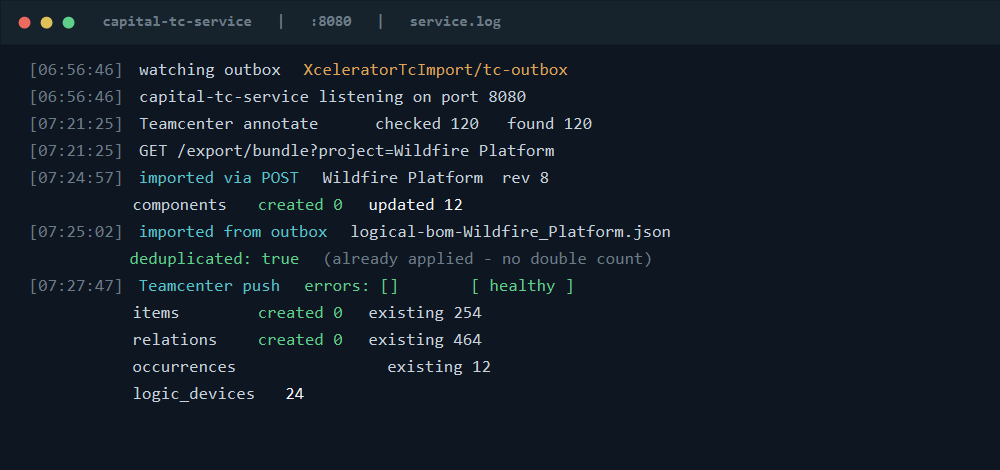
| Hub log — imports, TC push summaries, outbox events | tc-service\service.log; the last 60 events also feed the Systemscenter activity feed |
| Capital plugin / system log | %TEMP%\capital\2512\CapitalSystemsArchitect_*.log |
| Publish payloads | publish.outboxDir → staging/, processed/, failed/ |
| Store truth | merged head per project + append-only store-data\revisions\<project>\rev-NNNN.json snapshots (the CM seed) |
The outbox lifecycle
Every publish is delivered twice — POST to /import/bundle and an atomic outbox file — and the hub dedups the pair by sha256 so the store and Teamcenter see it once. The watcher (a daemon thread beside the ThreadingHTTPServer request threads) claims each logical-bom-*.json by renaming it into staging/, imports it, then moves it to processed/ on success or quarantines it in failed/ on any error — no file is ever silently dropped, a concurrent republish just lands as a fresh outbox file, and the outbox directory is re-checked every pass because Capital creates it lazily. This dual path is also the safety net for scale: a first push of a large nested structure can outlive the plugin's 30-second POST timeout, in which case the outbox completes the same bundle server-side (the 10053 line on the response write is harmless). It doubles as a review gate — stop the service before publishing, inspect the outbox JSON, then restart to process.
Annotation is batched — keep it that way
The live panel annotates every component and function with its Teamcenter status. The first implementation made two SOA round trips per element — ~240 calls on Wildfire, one to three minutes, which blew the panel's 30-second HTTP timeout the moment three Capital apps fetched concurrently. The rewrite batches getItemFromId with infos[] arrays (misses return as partialErrors keyed by clientId); an annotated Wildfire export now takes 1–3 seconds, and detail devices/connectors annotate through their push-convention candidate ids. Annotation stays best-effort: on any failure the hub serves the bundle unannotated rather than not at all. Any future per-element lookup in that path is a regression.
Known limitations & accepted rough edges
None of these block the proven flows; each has a working path around it today and a named longer-horizon fix.
| Limitation | Impact | Workaround / plan |
|---|---|---|
| Pathway graphics cannot ride the project XML partial | TC-materialized platform designs import without pathways, so Generate Logical Designs yields devices but zero nets/wires (a carrier without a pathway synthesizes no net). Data-only emission fails "Unable to find graphical node…"; full graphics fail "Parent diagram not loaded" — our emitted graphics are a simplified subset of Capital's native model. | Draw pathways in-app on the platform diagram (place the components first), add carriers, re-run Generate — the resulting nets flow through the already-proven publish path with no code change. Long-horizon: faithfully reproduce Capital's full graphics/styling model; the generator already gates three modes (pathways_mode = none | data | full). |
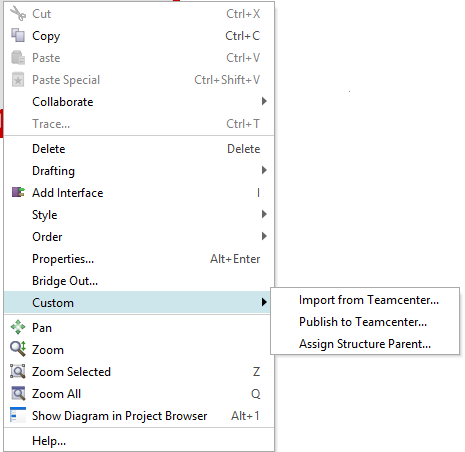
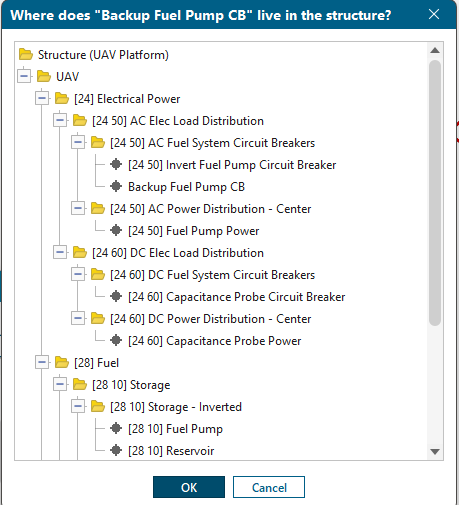
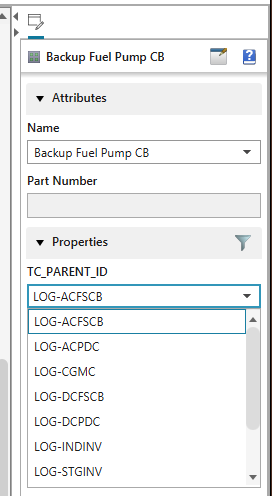
| QAP dropdown shows raw ids | Engineers picking a parent in the Quick Access Panel see LOG-ACFSCB, not "AC Fuel System Circuit Breakers" — OTI value lists are plain strings. | Prefer Assign Structure Parent… — the live Teamcenter tree with friendly names and 1808 addresses, and the source of truth anyway. A future OTI naming convention could carry both. |
| NX shows the spine as a listing, not in the Run Navigator | The fuel engineer sees the structure via the spine-consumer journal (Listing Window with "ADD FUEL EQUIPMENT HERE" cues), not as native logical equipment in the navigator — unmanaged NX has no hook to display a foreign parent hierarchy there. | Native Run-Navigator structure is the managed-mode milestone (TCCS + FMS + a 4-tier server pool + NX integration templates — a Teamcenter-admin track). The full data loop — see, author, publish, nest — already works unmanaged. |
| OTI pick-list goes stale on existing projects | When the architect lands a new spine node, an existing project's TC_PARENT_ID dropdown keeps its old values (Copy-As-Revision merge verified not to refresh it). | PM hand-edit (~30 s — and click New first, the fields are inert until then; project close + reopen to take effect), or re-bootstrap for clean-slate resets. Overwrite-mode merge is the untested automation candidate — test on a sacrificial project. The Assign dialog reads Teamcenter live and never goes stale. |
Publishers key meta.project three ways | Platform publishes by stamped identity → design name, logic by project name, functional by design name. It works today because stamps and names align — but a project rename could split one project into two store heads. | Unify all three on the project-name rule (stamped id first). Until then, keep the Element ID stamps on materialized designs intact. |
| Element ID can pick up typed whitespace | A value committed with Tab once carried a trailing tab character; the id still resolved correctly. | Cosmetic — trim on extraction is the tidy fix. |
| Dirty dev data on the shared instance | Orphan run-tagged device items under the Wildfire LBOM root (stale-service era) and extra "Unassigned - N" logic folders from repeated Generate. | Accepted on the dev instance; exact-id cleanup lists are staged, and removal is a user-confirmed mass delete. The UAV LBOM was already cleaned to a single pristine root child. |
docs/capital-structure-authoring-operations.md §6 first — empty import means a property-name collision, a flat publish means a stale plugin, demo data in the panel means an identity mismatch, and a POST timeout is just the outbox finishing the job.