THE MECHANISM
Hanging Elements on the Spine
Capital's platform design is deliberately flat — it has no place for a system tree. So the tree lives in Teamcenter as the MIL-STD-1808 spine, and every element an engineer draws gets hung under the right chapter node. The engineer supplies exactly one thing: the parent. This is the piece the whole integration turns on.
Why the spine can't be Capital-native
We looked for the system tree inside Capital first, and it isn't there by design. The 2512 project format's cluster element — the platform component — has no nested-cluster in its content model: a platform design is a flat list of clusters wired by pathways. Capital is a connectivity tool, not a structure tool, and that is the correct separation of concerns. NX organizes by part and assembly; the SysML model has the tree but no product configuration behind it. The one artifact that says this breaker belongs to the AC fuel circuit-breaker group, which belongs to electrical power, effective unit 151 on has traditionally lived nowhere.
So we put the tree where it belongs — in PLM — and carry each element's place in it as a plain property. On a Capital cluster that property is TC_PARENT_ID; when the design publishes, the hub reads it and materializes the element as a nested Fnd0LogicalBOMLine occurrence under its parent in the Teamcenter Logical BOM. Capital stays flat; the structure it round-trips through is not.
The one input: TC_PARENT_ID
The design goal was ruthless: an engineer adding an element should type one thing. Everything else the hub derives, so a naive publish is always complete and always safe.
| What | Who supplies it |
|---|---|
Parent in the spine (TC_PARENT_ID) | The engineer — picked, not typed (below) |
| Provenance (elec-add / fuel-add / sysml-add) | Hub — derived from the publishing tool (meta.source) |
Effectivity (unit ≥ 151) | Hub — inherited from the design-level change wave |
| Identity (the join key to Teamcenter) | Hub — stamped Element ID, else the Capital UID |
| Existing enrichment on a re-publish | Hub — merge-preserve: a re-publish can never strip a field the tool didn't send |
That table is the reason the workflow is three moves instead of thirty. The engineer never maintains provenance, never re-types effectivity, never invents an id — and can re-publish the same design a hundred times without churn.
Two ways to pick the parent
Because the one input is the parent, the whole ergonomics problem reduces to picking a node from the live spine. There are two paths, and both draw from Teamcenter so neither can go stale in a way that invents structure.
Assign Structure Parent… — the live tree picker
Select one or more components on the diagram, right-click → Custom → Assign Structure Parent…, and the plugin fetches the live Teamcenter structure and shows it as a tree — friendly names plus MIL-STD-1808 chapter addresses. The dialog even asks the question in plain language: “Where does ‘Backup Fuel Pump CB’ live in the structure?” Pick a node and it stamps TC_PARENT_ID on every selected component. Because it reads Teamcenter on every use, an architect's brand-new spine node appears here immediately — this is the source-of-truth picker.
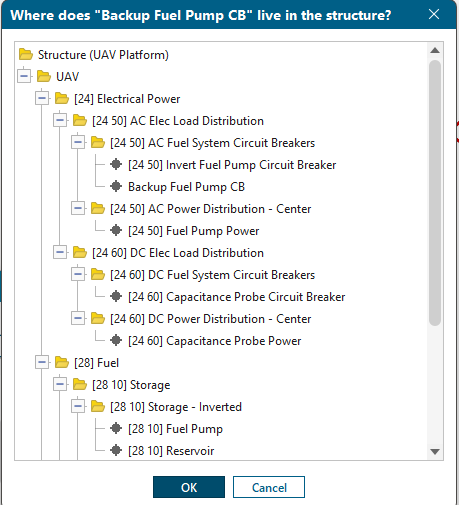
One implementation detail that matters: the stamp only commits when the action returns success. Capital's plugin write API applies attribute changes atomically at the end of a successful action — which is precisely why this is an action with a dialog rather than a button on a panel (a panel cannot commit a write). Cancel changes nothing.
The QAP dropdown — picking without a dialog
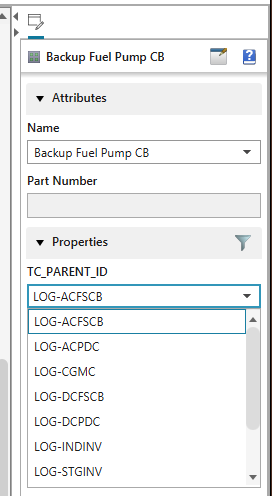
For the fastest path, TC_PARENT_ID is also a Quick Access Panel dropdown. Its values are not free text — they come from the project's Object Type Information, which the hub generates into the project XML automatically from the Teamcenter-backed bundle (valid parents are every referenced parent plus every architect-owned spine node). So the dropdown offers real spine ids and nothing else. It shows raw ids where the Assign dialog shows friendly names, so on camera we prefer the dialog; for a power user placing many elements, the dropdown is quicker.
What the hub does with it — the roll-up
On publish, the hub walks the components and, for each one carrying a TC_PARENT_ID, resolves that parent to a Teamcenter item — either an element created earlier in the same push, or one already living in Teamcenter from a prior publish — then groups children by parent and adds them as occurrences under the resolved node. The structure operation is idempotent: an element already nested is left alone, so re-publishing adopts rather than duplicates.
The proof point is a full re-publish of the Capital-materialized UAV Platform:
Zero items created means every element resolved to something already in Teamcenter; 24 occurrences nested under 15 distinct spine parents means the tree rebuilt itself under the 1808 addresses instead of landing flat. That is the roll-up working at scale.
The result — one nested structure
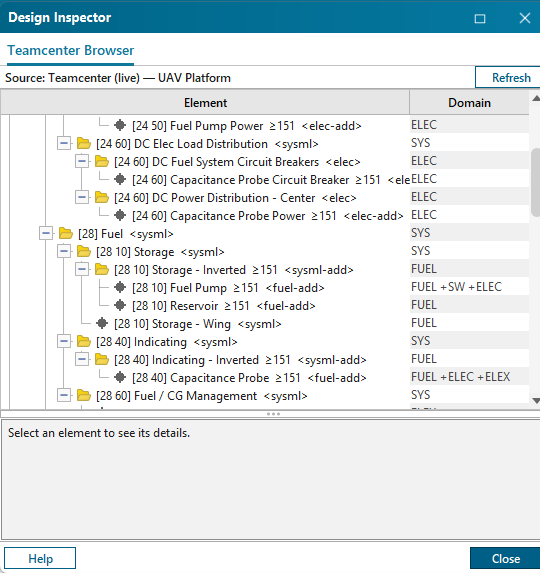
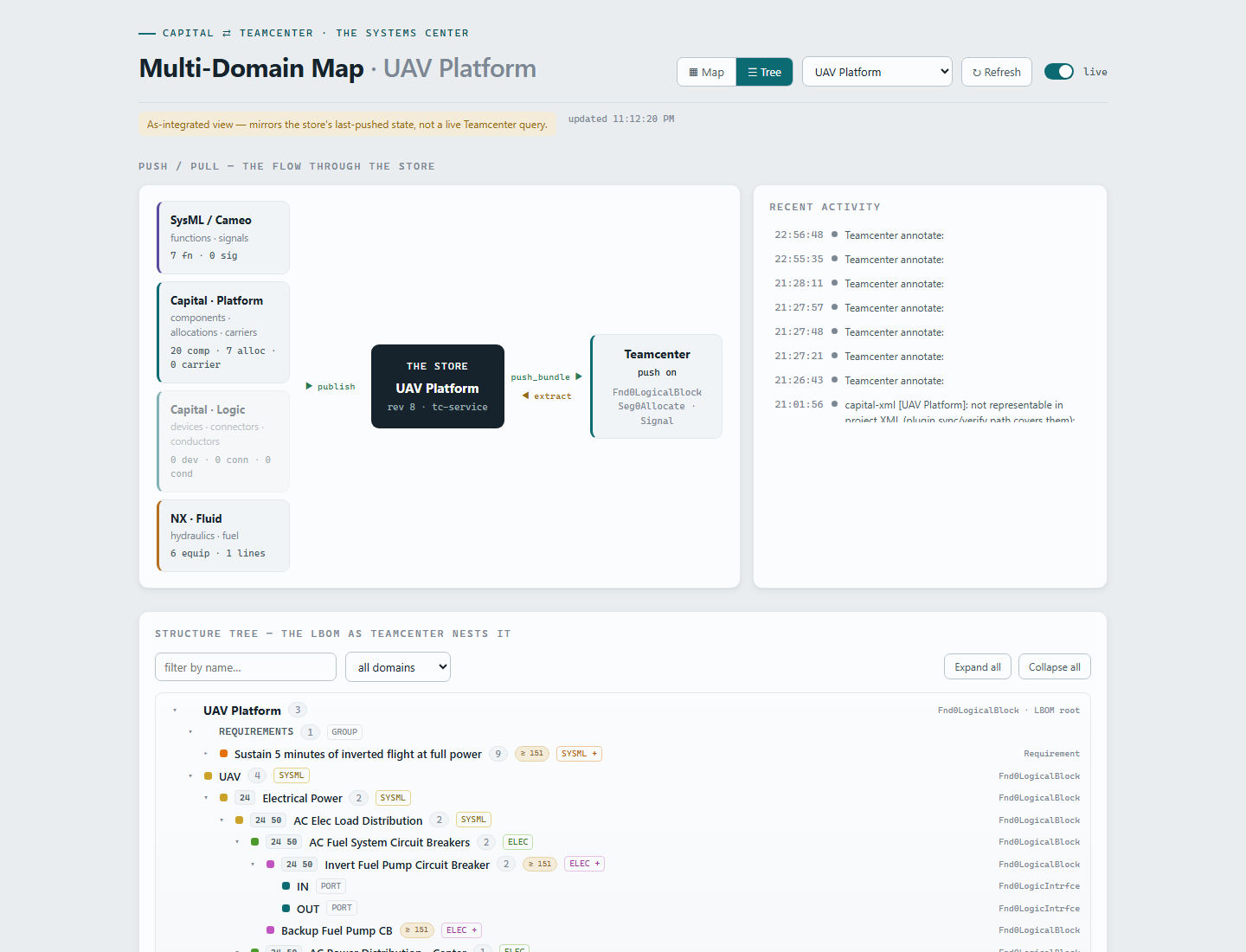
Once elements are hung, every seat sees the same tree. In Capital's own Teamcenter Browser the components nest under their chapter addresses with effectivity and provenance; in Systemscenter the same structure renders with provenance colors, effectivity pills, and the domain filter — the requirement heading the thread at the top.
Home ribbon → Component → two clicks. Name it.
Right-click → Custom → Assign Structure Parent… for the live tree, or the QAP TC_PARENT_ID dropdown for speed. This is the only structure decision.
Ctrl+S, then Publish to Teamcenter…. The hub derives provenance, effectivity, and identity, and nests the element under its 1808 address — visible in Systemscenter seconds later.