THE JOURNEY
The Multi-Domain Thread — A Guided Walkthrough
One requirement ripples through four tools and lands as one nested structure in Teamcenter. This is the inverted-flight scenario told end to end — every beat below ran live on Capital 2512 and Teamcenter 2506, July 3–5, 2026.
The scenario comes from the customer's System Architecture – Platform Schematic (Rev A) document: a UAV program receives a new requirement, and thirteen steps later the fuel, electrical, electronics, and software domains have all reacted — inside one common logical structure. We rehearsed it as six acts. The spine of the story is the MIL-STD-1808 chapter address: it is the cross-tool join key that lets a SysML architect, an NX fuel engineer, and a Capital electrical engineer all hang their work on the same tree without ever exchanging a file with each other.
| Act | Scenario steps | Status |
|---|---|---|
| I — The requirement lands | Step 0 | proven live |
| II — The architect extends the spine | Steps 1–3 | proven live |
| III — The fuel engineer in NX | Steps 4–5 | proven live native navigator: managed-mode track |
| IV — The electrical engineer in Capital | Steps 6–7 | proven live |
| V — The logic layer | bonus beat (not scripted) | proven live reverse import into Capital pending |
| VI — One structure | Steps 11 & 13 | proven live |
| Electronics / software / simulation | Steps 8–10, 12 | same mechanism, narrated over the CG computer |
Act I — The requirement lands
Everything starts with a change: the platform must sustain five minutes of inverted flight at full power, effective from unit 151. We don't model that as a slide — REQ-000123 is a real Teamcenter Requirement item, pushed through the hub by the seed pipeline (seed-uav-platform.py --post: store import, enrichment, TC push in one shot).
REQ-000123 carries the requirement text as its description, plus sysml-add provenance and the ≥151 effectivity badge that mark it as part of this change wave.
The hub relates it via IMAN_requirement to nine elements: satisfies to the seven inverted-flight functions (FN-INVRES, FN-VAPOR, FN-INVLVL, FN-CAUTION, FN-WARN, FN-REFILL, FN-PUMPCTL) and derives to the two architecture elements the requirement spawns — Storage-Inverted and Indicating-Inverted.
Requirements connect through relations only — they are never occurrences in the structure. Open REQ-000123 in Active Workspace and its relations fan out to all nine elements; open any FN-* revision and the relation points back.
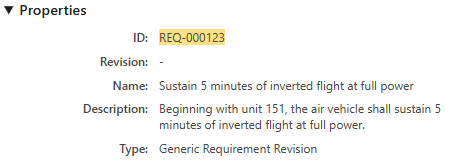
Requirement type enforces "REQ-"nnnnnn — six digits — on the Requirement ID. REQ-123 is rejected at creation; REQ-000123 passes. Bake the padded form into every authoring pipeline.Act II — The architect extends the spine
The MIL-STD-1808 spine — UAV → [24] Electrical Power / [28] Fuel → chapter groups → logical elements — is published once from a committed seed and owned by the architect. Chapter/group nodes are minted by exactly one producer; every other tool only references them. The inverted-flight requirement demands two new logical elements, and the architect adds them where they belong:
A new logical element (LOG-STGINV) nests under the Storage chapter group, carrying sysml-add provenance and effectivity ≥151 — visually distinct from the original sysml spine around it.
Same pattern (LOG-INDINV). Each element has exactly one structural parent; any additional allocations stay as Seg0Allocate trace relations, so the tree never forks.
We push the functions and their allocation table in the same wave: two onto Storage-Inverted, one onto Indicating-Inverted, three onto the CG Management Computer, one onto Storage-Wing — 7 Functionality items, 7 Seg0Allocate relations, 0 errors.
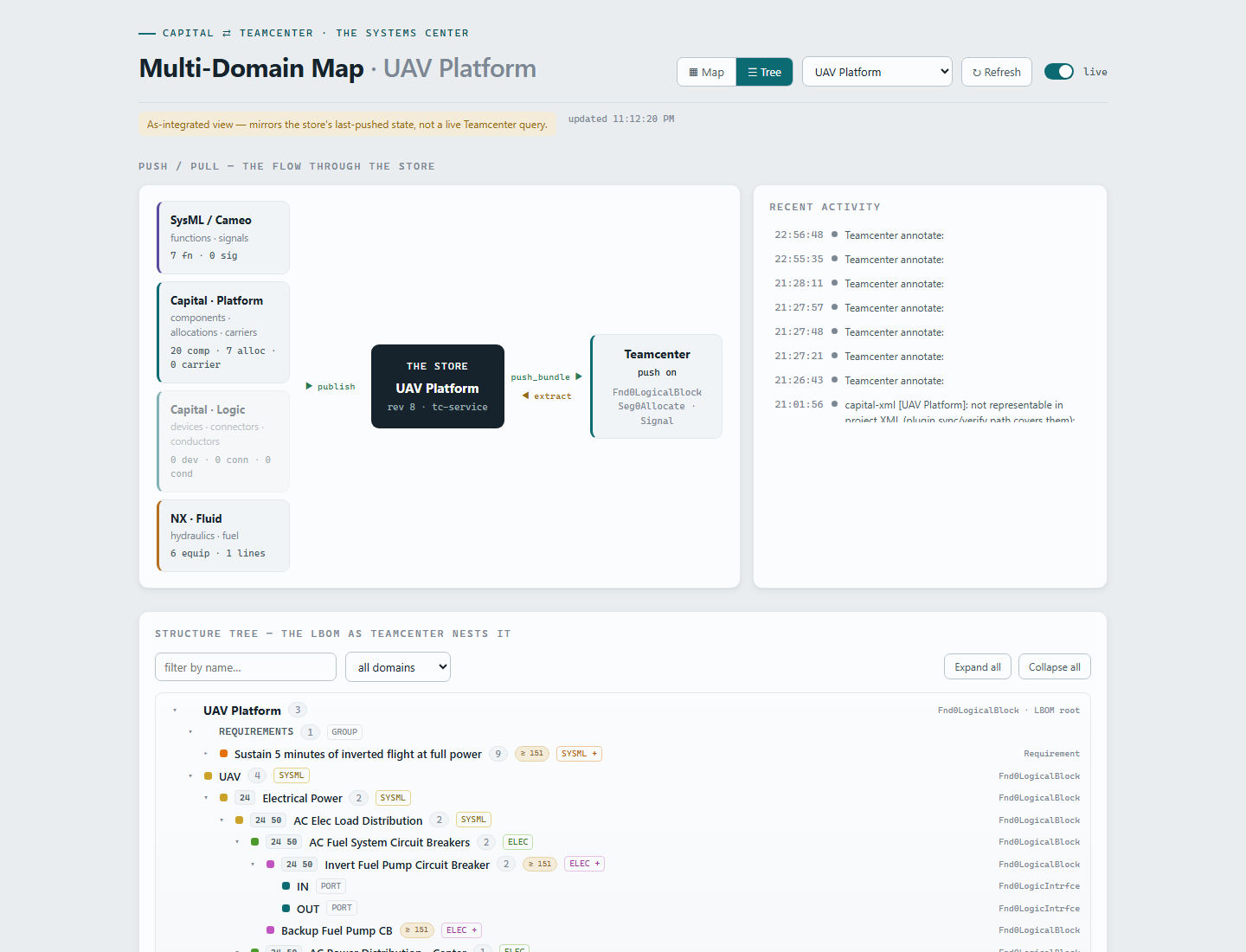
TC_EFFECTIVITY / TC_PROVENANCE properties for this demo — the ≥151 filtering is view-side, not native Teamcenter unit effectivity. We say so out loud; the upgrade path is config-gated, not a rewrite.Act III — The fuel engineer sees the structure in NX
The fuel engineer's NX seat is native — no managed Teamcenter connection. It doesn't matter: the hub serves a read-only spine slice, and an NX journal renders it inside the session.
GET /export/spine?under=28&depth=2
→ the Fuel branch with ancestor context: 9 elements,
the two sysml-add leaves cued "ADD FUEL EQUIPMENT HERE"Tools → Journal → Play → nx_spine_consumer.py: the Listing Window shows the Fuel branch live from the hub, 1808 addresses included, with explicit cues on Storage-Inverted and Indicating-Inverted. (The native Run Navigator view of this structure is the managed-mode deliverable on the admin track — we narrate that beat.)
Fuel Pump, Reservoir, and Capacitance Probe are drawn in NX Diagramming (Piping discipline) — normal NX authoring, no plugin in the way.
nx_fluid_reader.py runs headless against the .prt, emits a neutral bundle (domain FUEL), and POSTs it to /import/bundle. The hub enriches — fuel-add provenance derived from the source, ≥151 inherited — and the nested TC push lands the pump and reservoir under Storage-Inverted, the probe under Indicating-Inverted.
patch-maps/parentid-patch.fuel.json) fills parentId by name at import time — read fresh per import, no service restart, works for any source. The demo never depends on a foreign tool having stamped the right property.Act IV — The electrical engineer reacts in Capital
This is the money beat, and it is entirely live. The electrical engineer opens Systems Architect and the Teamcenter Browser panel — a tree-table that always follows the open project — already shows the fuel team's additions.
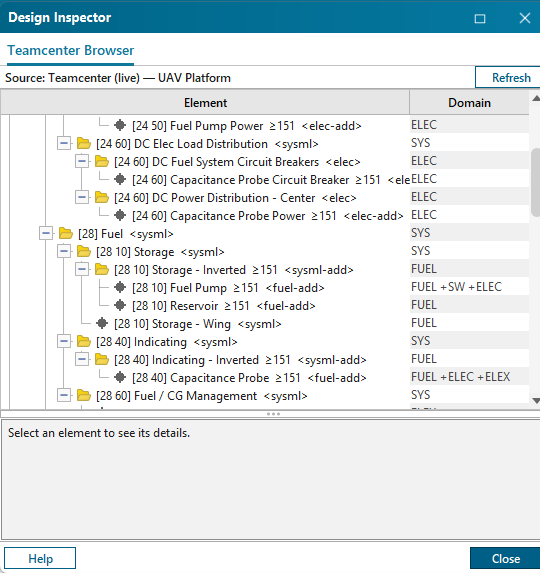
The panel reads the hub live; Refresh re-pulls. The new pump sits under Storage-Inverted with fuel-add — the electrical team sees the fuel demand the moment it exists.
Home ribbon → Component → two clicks on the canvas. Breakers and feeds for the inverted-flight pump circuits — ordinary Capital authoring.
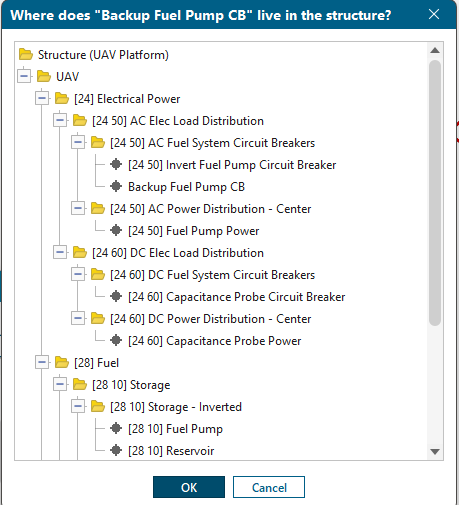
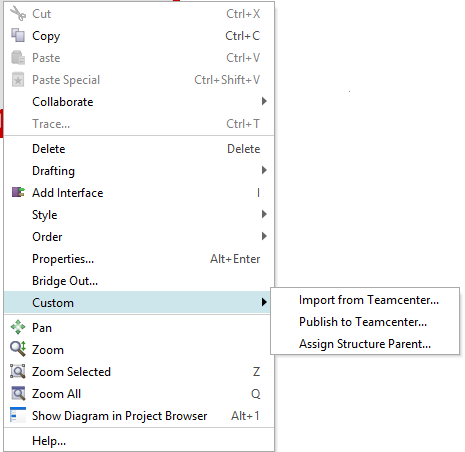
Right-click → Custom → Assign Structure Parent… opens the live Teamcenter structure as a tree (names + 1808 addresses, multi-select). One pick stamps TC_PARENT_ID. The Quick-Access-Panel dropdown is the keyboard-fast alternative; the dialog is always current because it reads Teamcenter on every use.
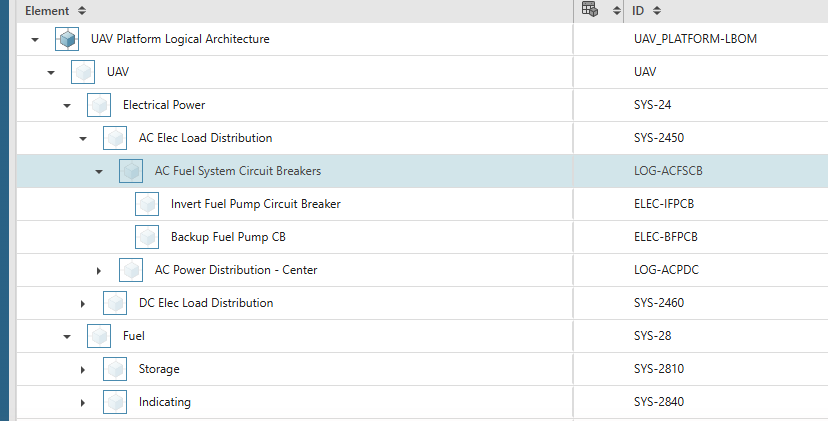
Ctrl+S, then right-click canvas → Custom → Publish to Teamcenter…. The push created the breaker as a Fnd0LogicalBlock and nested one occurrence under [24 50] AC Fuel System Circuit Breakers — zero errors.
Systemscenter (or the browser panel) shows the new element under [24 50] with elec-add and ≥151 — neither of which the engineer typed.
TC_EFFECTIVITY (set once per change wave), falls back identity to Capital's internal ID, and merge-preserve guarantees a naive re-publish can never strip enrichment it didn't send.Act V — The logic layer
Architecture isn't the end of the electrical story — Capital generates detailed logic designs from the platform design, and those flow into the same structure.
Capital's native Generate Logical Designs turns platform components into devices. No custom code in this step.
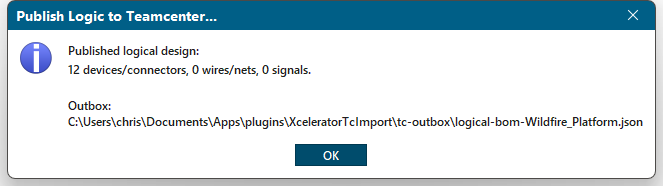
Available in Logic Designer, Platform Designer, or SA whenever a logic design is open. Devices nest as occurrences under the platform component they realize, with seg0Kind=LogicDevice stamped on the revision at creation; conductors land as Fnd0LogicConn items trace-linked to their endpoint devices.
Regeneration mints all-new Capital UIDs, so the publisher derives stable ids — devices key on their source component, connectors on owner + name, nets on name — and the hub dedups on the same keys. Regenerate + republish means updates, not duplicates: proven at Wildfire scale with items_created 0 / items_existing 134 / errors [] on the round trip.
The reverse leg exists too: /export/capital-xml?project=X&logic=1 materializes the Teamcenter logic layer as a real, DTD-validated <logicaldesign> — devices, connectors, nets — with the TC ids stamped so a publish-back resolves the exact items. partial Import verification of that generated file inside Capital is the one leg still on the list.
Act VI — One structure
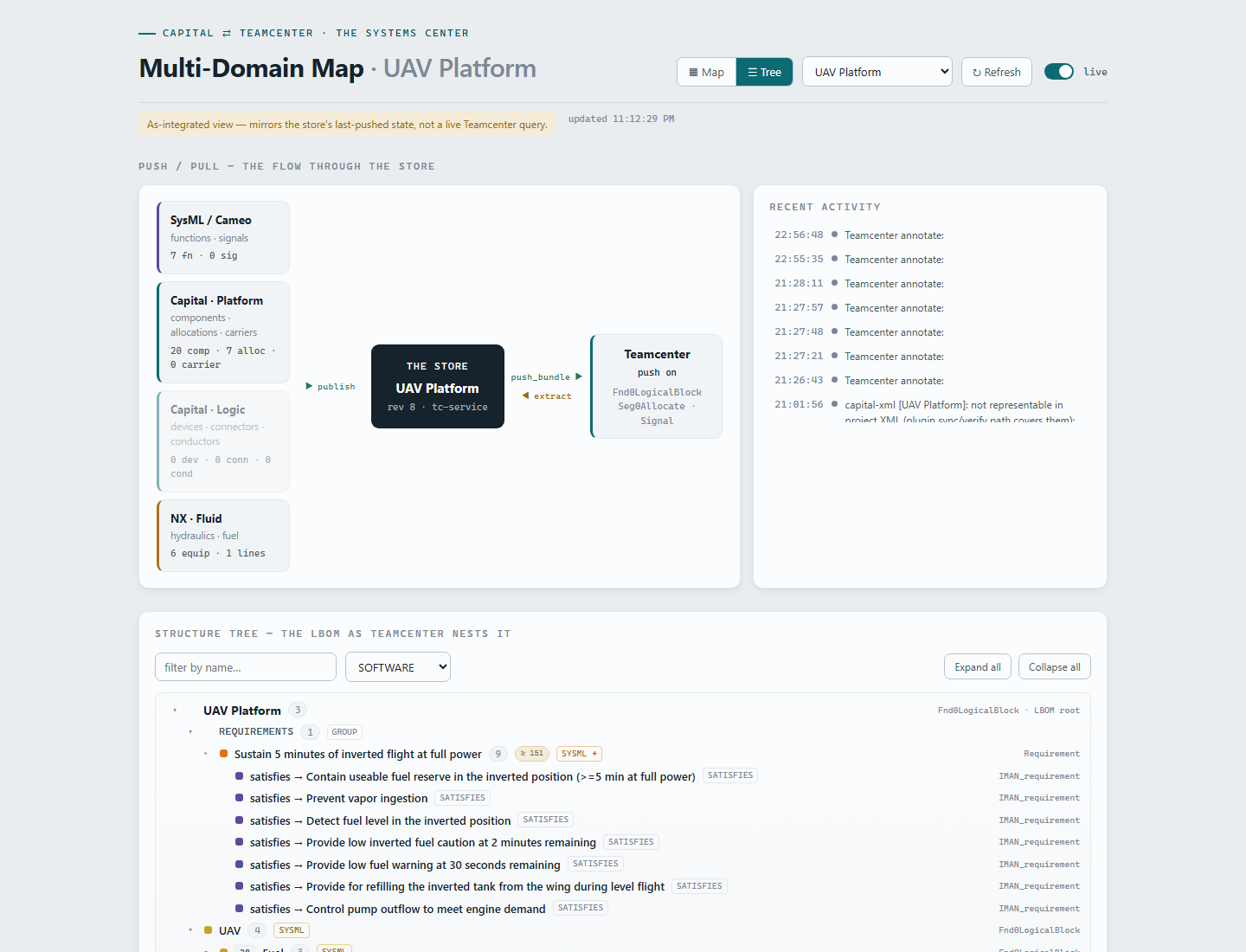
Now the payoff. Open UAV_PLATFORM-LBOM in Active Workspace: a single child, UAV, and under it the whole 1808 tree — SysML spine, fuel equipment, electrical breakers, logic devices — one nested structure, not four exports.
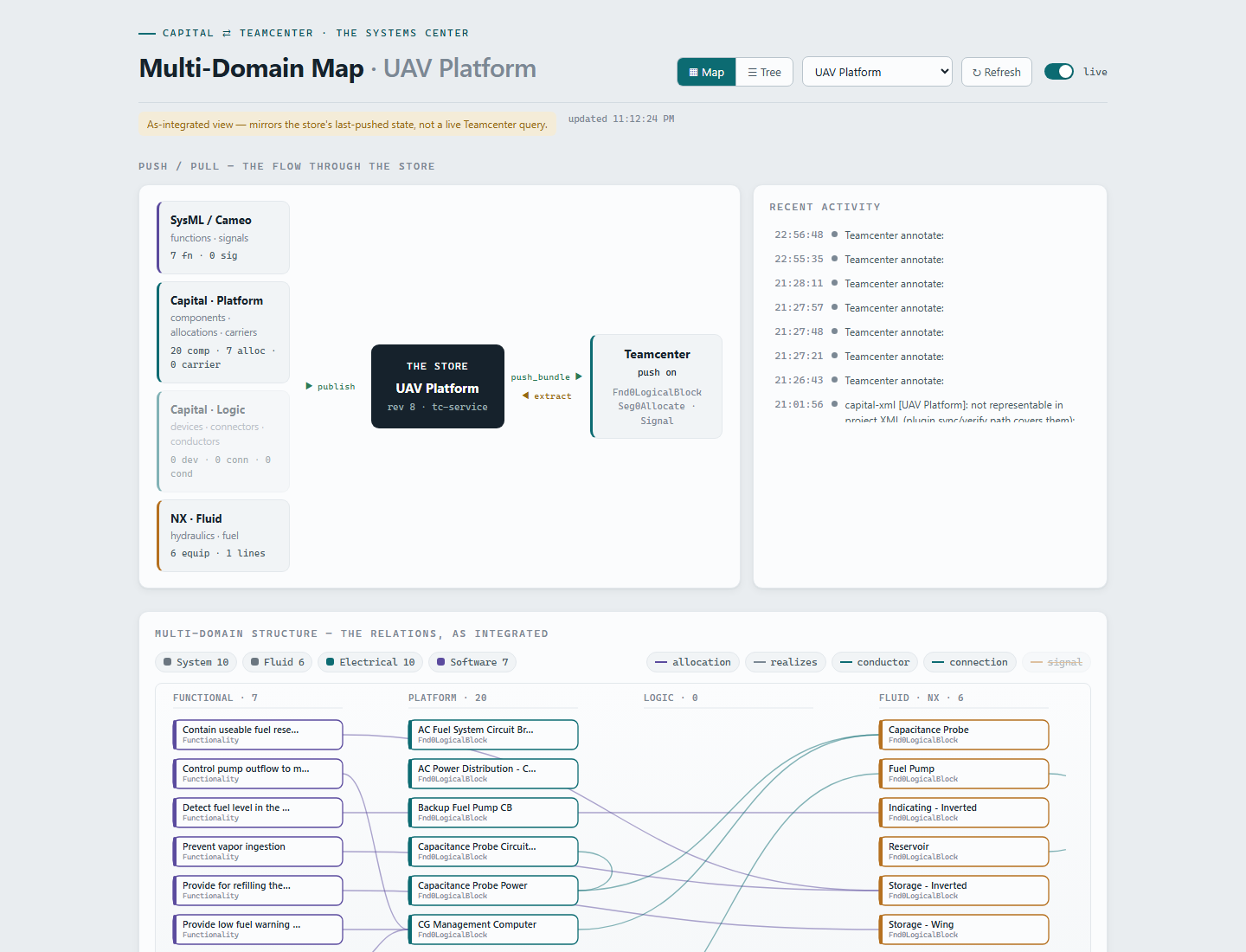
Systemscenter reads the same neutral bundle and adds what a BOM table can't: provenance colors telling you who added what in which tool (sysml sysml-add elec-add fuel-add), effectivity pills marking the ≥151 wave, and a live toggle that shows publishes landing in real time. The closing walk of the scenario happens in one view, top to bottom: the Requirements group → REQ-000123 → seven functions (satisfies) → the logical architecture (derives + allocations) → the domain designs nested under their chapter addresses. Every hop is a real Teamcenter object or relation — nothing narrated.
Coda — the pump that lives in three domains
The sharpest question this architecture answers came from the demo itself: the fuel pump is a fluid device, it draws electrical power, and it runs firmware — so which domain does it belong to? The wrong answer is three copies. Duplicating an element per domain forks its effectivity, its structure placement, and its publish-back identity.
Our answer: one element, one identity, and a derived participation set. The pump's domain stays FUEL — the owning discipline whose publish masters it. Its domains[] set is recomputed by the hub on every import from evidence in the merged head: the power feed connection adds ELECTRICAL; its declared firmware (and any Software-typed function allocated to it, like FN-PUMPCTL) adds SOFTWARE. The Capital panel's Domain column reads FUEL +SW +ELEC; the capacitance probe earns FUEL +ELEC +ELECTRONICS from pure connection evidence, nothing declared. Flip Systemscenter's domain filter to FUEL, ELECTRICAL, or SOFTWARE and the pump appears in all three views — the same node, the same Teamcenter item, never a copy.
Derived, not typed, is the point: no engineer maintains a "domains" checkbox, and the set can never drift from the actual design evidence. That is the systems center doing its job — every domain tool reads and writes one common logical structure, and the seams between the domains become data.