WHERE THIS GOES
The Systemscenter Roadmap
The systems center works: one neutral logical structure, mastered in Teamcenter, that every domain tool reads and writes. This page is where we take it next — from a proven integration to an Active Workspace product, and from three Capital tools plus NX to the whole Xcelerator portfolio.
From integration to product
The proof-of-concept phase ended with a specific, measurable claim: the systems-center model survives contact with real scale. On the Wildfire Platform we authored the entire architecture in Teamcenter, materialized it into Capital Systems Architect as a native project, and published it back — and the hub resolved every single object to its original Teamcenter identity. proven live
Zero creates on republish matters more than any single feature. It means identity, adoption, and idempotent writes — the hard problems of a bidirectional integration — are solved in the hub, not papered over per tool. And the solution turned out not to be Capital-specific at all. The pieces that made Wildfire work are the pieces that make any tool work:
- Stable external identity with a defined precedence (
TC_ID→Element ID→ tool-native id), so a design that leaves Teamcenter and comes back still knows who it is. - Ensure-then-adopt writes — the hub matches existing Teamcenter objects (including tool-minted ids like Capital's
CONN-<n>connections, adopted by endpoints and carrier) before it ever creates. - Merge-preserve enrichment — republishing from a tool that doesn't carry parentage, provenance, or effectivity never wipes them; the hub derives provenance from the publisher, defaults effectivity, and fills parents from patch maps.
- Parent-resolved nesting — every component lands under the right node of the shared MIL-STD-1808 spine, whichever tool published it.
The generality claim was then tested the honest way: we brought up a second authoring stack. The NX Diagramming reader — a single NXOpen journal emitting the same bundle — pushed a fluid schematic into Teamcenter through the unchanged hub the same day it was written. proven live The one-pager's conclusion stands: the neutral data contract is the hard, proven part; productizing is mostly the presentation layer.
The Active Workspace path
Decision, made 2026-07-04: Systemscenter ships as an Active Workspace application first, not a standalone web app. The common logical schematic structure becomes a first-class PLM view — same shell, same navigation, same auth and session as the rest of Teamcenter — rather than a side tool with its own login and look.
The reasons are practical, not aesthetic. AW runs on the same Teamcenter SOA the neutral bundle is assembled from, so the data is already where the app lives. AW brings the Siemens design language, dark/light theming, and accessibility for free. And users reach it where they already work — a systems engineer browsing the LBOM in AW should fall into the cross-domain map without changing tools.
This is further along than a slideware decision. Two linked lenses over the neutral structure exist and are verified against real Teamcenter data:
- Structure Map — the cross-domain relationship graph: columns Functional | Platform | Logic | Fluid (NX), nodes colored by domain and labeled with their TC type, edges for allocation / realizes / conductor / connection / signal, hover-to-isolate, domain and edge-type filters. proven live
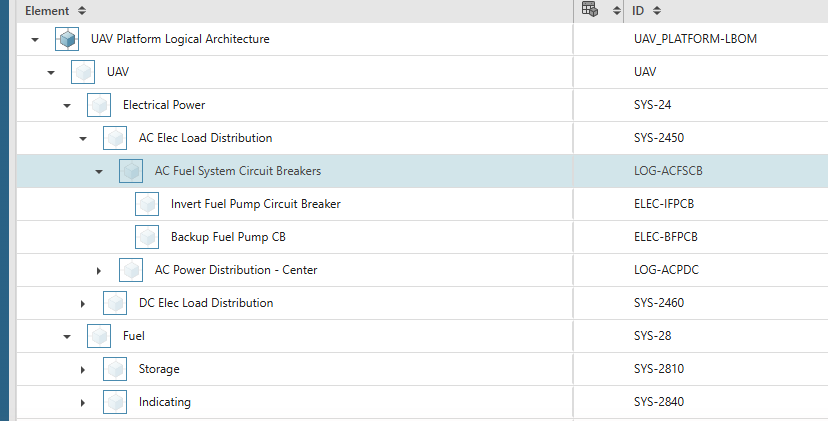
- Structure Tree — the LBOM exactly as Teamcenter nests it (191 rows on Wildfire), with provenance dots sysml sysml-add elec-add fuel-add, MIL-STD-1808 chapter badges, effectivity pills, and a domain-participation filter. proven live
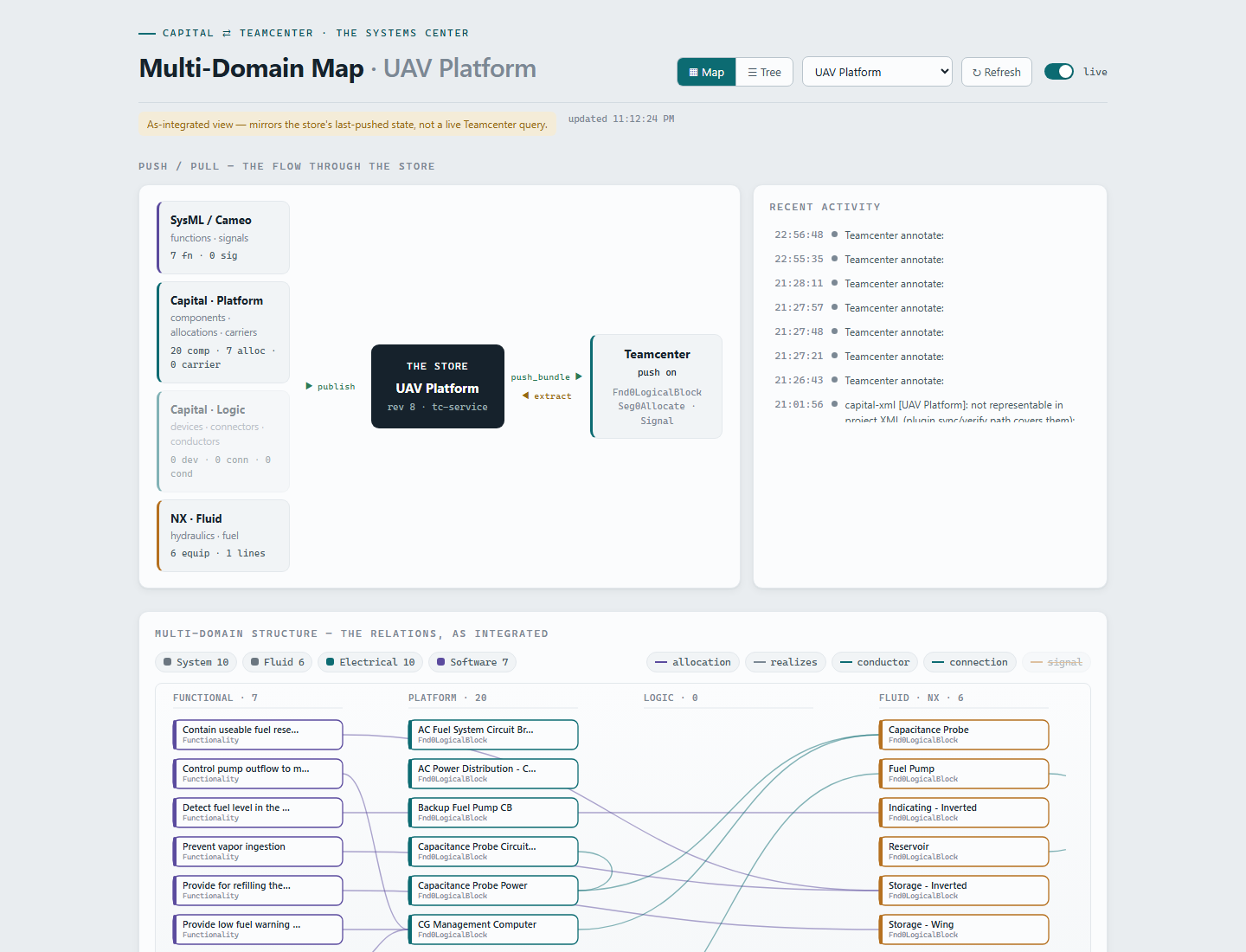
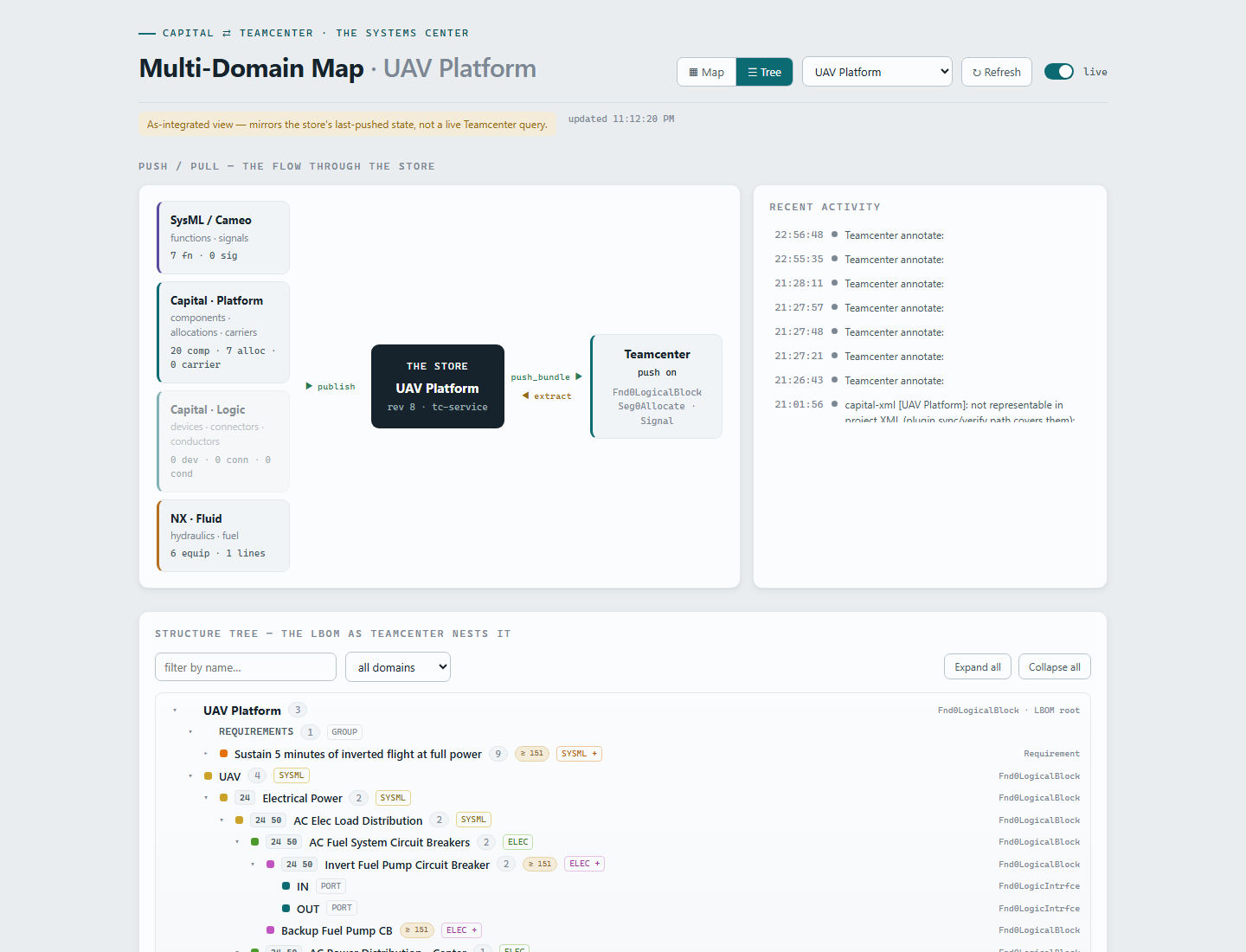
The on-ramp to AW is already built: a real SWF solution (SWF is Active Workspace's own declarative React framework) lives in systemscenter/app/, with the map ported into an <ssc-structure> custom element reading the neutral bundle from the hub. It builds offline from vendored @swf/* tarballs and renders both lenses with live data across all four demo projects. proven live What remains is the AW-integration engineering partial:
- Extension shape for TC 2506/2512 — declarative view-model plus custom component, or a full custom location that cleanly hosts a d3/SVG canvas.
- Data path — call SOA directly from the AW client, or keep
tc-serviceas a backend-for-frontend serving the already-proven bundle assembly. - Packaging and placement — how the module is built, staged, and deployed; a global "Systemscenter" location versus a contextual tab on an object.
First move, per the one-pager: stand up a hello-world custom location in the dev AW, then port the Structure Tree first — simplest lens, highest signal.
Near-term engineering roadmap
These are the concrete items between today's proven baseline and a pilot-hardened product. Sizes are engineering judgment; status distinguishes what is proven, what is partially landed, and what is planned.
| Item | Why it matters | Size | Status |
|---|---|---|---|
| NX managed-mode Run Navigator structure | The fuel engineer should see the shared logical structure natively in NX's Run Navigator. The unmanaged bridge (spine slice → NX journal, publish-back nests into TC) is proven; the native navigator view requires managed NX — TCCS, a 4-tier server pool, FMS, and NX-integration templates on the Teamcenter side. Setup guide: docs/nx-teamcenter-managed-connection.md. |
Large (admin-gated) | partial — bridge proven, managed mode with the TC admin |
| Publisher project-keying unification | The three publish actions key meta.project three different ways (platform: stamped id → design name; logic: project name; functional: design name). It works today because the stamps align, but one rule — stamped id, then project name — removes a whole class of duplicate-LBOM-root bugs. |
Small | Planned |
| Pathway graphics fidelity | Capital's importer requires a full native graphical model per interconnect node — grid, data dictionary, styling, per-cluster shapes — which our generated XML doesn't yet emit, so TC-authored platforms arrive without pathways and Generate produces devices but no nets. The proven interim: engineers draw pathways in-app, re-Generate, and nets flow through the unchanged publish path. Faithful graphics emission makes even the connected schematic fully TC-authorable. | Large (long-horizon) | Planned — interim workflow proven live |
| OTI refresh path | The TC-derived TC_PARENT_ID dropdown is correct at project bootstrap, but Capital's Copy-As-Revision merge import does not refresh project-level Object Type Information (verified); Overwrite-mode merge is untested. The Assign Structure Parent dialog is always live from TC, so this is a convenience gap, not a correctness gap. |
Small | partial |
| In-Capital verification of generated logic designs | The hub materializes a real <logicaldesign> (devices with pins, connectors, nets) from Teamcenter, DTD-validated against Capital's own 2512 project.dtd and gold samples. The last step — importing it into a Capital seat and inspecting it — is pending. |
Small | partial |
| Wire-level logic round-trip | Conductors already round-trip at device level: the 11 Wildfire logic nets live in TC as Fnd0LogicConn and extract back with correct device endpoints. Remaining: pin-level wire endpoints, and occurrence-level wiring in Teamcenter (TC_Connected_To / appearance-path nodes) so connections light up AW's Interface Details view — the recommended path is a small custom SOA wrapper on the TC side. |
Medium | partial — device level proven live |
| Requirements authoring flow | Requirements are TC-mastered today: REQ-000123 is a real TC Requirement item with nine trace links (7 satisfies to functions, 2 derives to architecture adds), visible top-of-tree in Systemscenter. Authoring and editing requirements from the domain tools — and ultimately mastering them in Polarion — is the next leg. |
Medium | Planned — TC-mastered flow proven live |
| Multi-customer / multi-program scoping | The hub keeps clean per-program heads with append-only revision history, but it runs as a single local service with no authentication and a shared configuration. Production needs program isolation, access control, and run-tag discipline (the test-round runTag stays empty in production). |
Medium | Planned |
The bigger picture: one contract for the portfolio
The neutral bundle was designed tool-agnostic, and the cost of joining it is now empirically known: one reader that emits components, connections, and functions as JSON, plus a POST to the hub. The hub does everything else — provenance from the publisher's identity, effectivity defaults, parent patch maps, domain-participation derivation, idempotent Teamcenter push. That is the whole integration burden NX paid, and it joined the digital thread in a day.
Two portfolio spokes are next, and both are cheaper than NX was because their data is already in the schema:
- Polarion — requirements. The contract carries
requirementLinks[]today, and the Teamcenter mapping (Requirement items,IMAN_requirementrelations, theREQ-nnnnnn naming rule) is proven live. Polarion becomes the requirements master publishing the same links; the trace thread from requirement to function to logical element to domain design is already rendered in the tree. - Simcenter Amesim — parameters. Maturing engineering parameters are first-class in the contract, keyed by maturity state:
{ "name": "weight", "unit": "kg",
  "values": { "budget": "3.5", "simulated": "3.2" } }

// suggested states, in precedence order:
// target → budget → simulated → product → tested
A simulation run publishing simulated values against the same component identities is a reader plus a POST — the schema, the identity model, and the visualization are waiting for it. (In the 13-step demo scenario this is step 12, narrated today rather than run.)
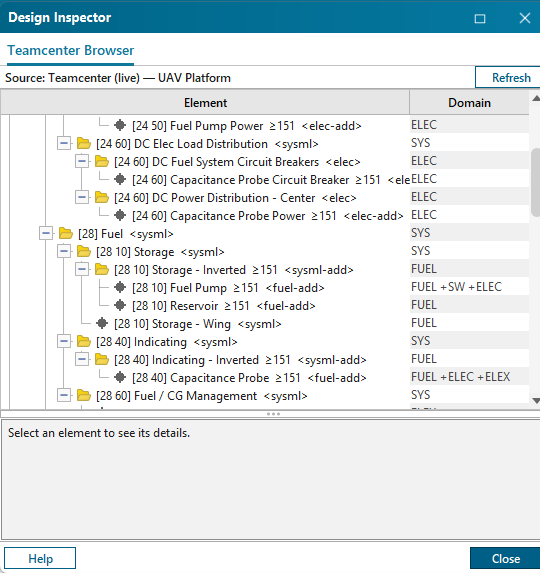
The design decision that makes portfolio convergence safe is already in: one element, one identity, domains as a participation set. A fuel pump is not three objects in three tools — it is one object that participates in FUEL, ELECTRICAL, and SOFTWARE, with participation derived by the hub from declared attributes and connection evidence. Every new spoke enriches the same object instead of forking it. proven live
What a pilot program needs
For engineering leadership weighing a pilot: the scenario we would run is the 13-step inverted-flight thread — requirement to functions to logical architecture to fuel, electrical, and software domains — and eleven of its thirteen steps execute live today (the two narrated steps are PCB/software BOM integration and the Amesim leg). Here is what a pilot actually requires.
Capital 2512 seats and a Teamcenter 2506 instance reachable at https://<teamcenter-gateway>, the plugin suite deployed to <CapitalHome>\plugins\XceleratorTcImport, and the hub (tc-service) running beside them. The full procedure, including the launcher-based licensing workflow and plugin redeploy cycle, is in the setup guide.
A logical spine (a SysML/MIL-STD-1808 export or a seed bundle), one platform design, and optionally an NX schematic part. Delivered files whose components don't carry parent ids are absorbed by hub-side patch maps — no plugin rebuild, no file surgery.
Author a requirement, flow the architecture down, let a fuel engineer and an electrical engineer each add real equipment from their own tool, and watch both land nested in the one common LBOM — in Active Workspace and in the Systemscenter views. Every hop is a real Teamcenter object or relation.
Zero-create republish (nothing duplicates, ever), correct nesting under the shared spine from every tool, and live panels that follow the open design. Measure the pilot the same way — the numbers on this page are the baseline to beat.