THE WORKED EXAMPLE
The Inverted Flight Fuel System
Everything on this site is demonstrated on one model, so that every number can be checked against the same source. This page introduces it, shows it in each tool, and gives you the exact commands to reproduce every figure.
Why this model
A fuel system that keeps running while the aircraft is inverted. The inverted-flight capability is structural rather than decorative: a HeaderTank and a FlopTube form a dual-source pickup — whichever one is submerged at the current attitude feeds the engine — and they sit upstream of the ElectricBoostPump. That gives the model something real to be right or wrong about.
It was built specifically to exercise every object type the Teamcenter sync targets, on a model that had never touched Teamcenter before.
Twelve blocks: the FuelSystem composite plus MainFuelTank, HeaderTank, FlopTube, ElectricBoostPump, CheckValve, FuelFilter, FuelPressureRegulator, Engine, FuelControlUnit, FuelPressureSensor and FuelQuantitySensor. Three interface blocks, five signals, 22 proxy ports, 11 connectors with 11 realized item flows, four requirements with satisfy links, and a behaviour layer of 16 functions.
1 · The source model in Cameo
This is where a human authors. Note what the containment tree shows: every package and every block already carries its Teamcenter item id in parentheses. That stamp is the identity backbone of everything downstream — it is how a symbol on an NX drawing, a component in Capital and an item in MADe are all known to be the same object.
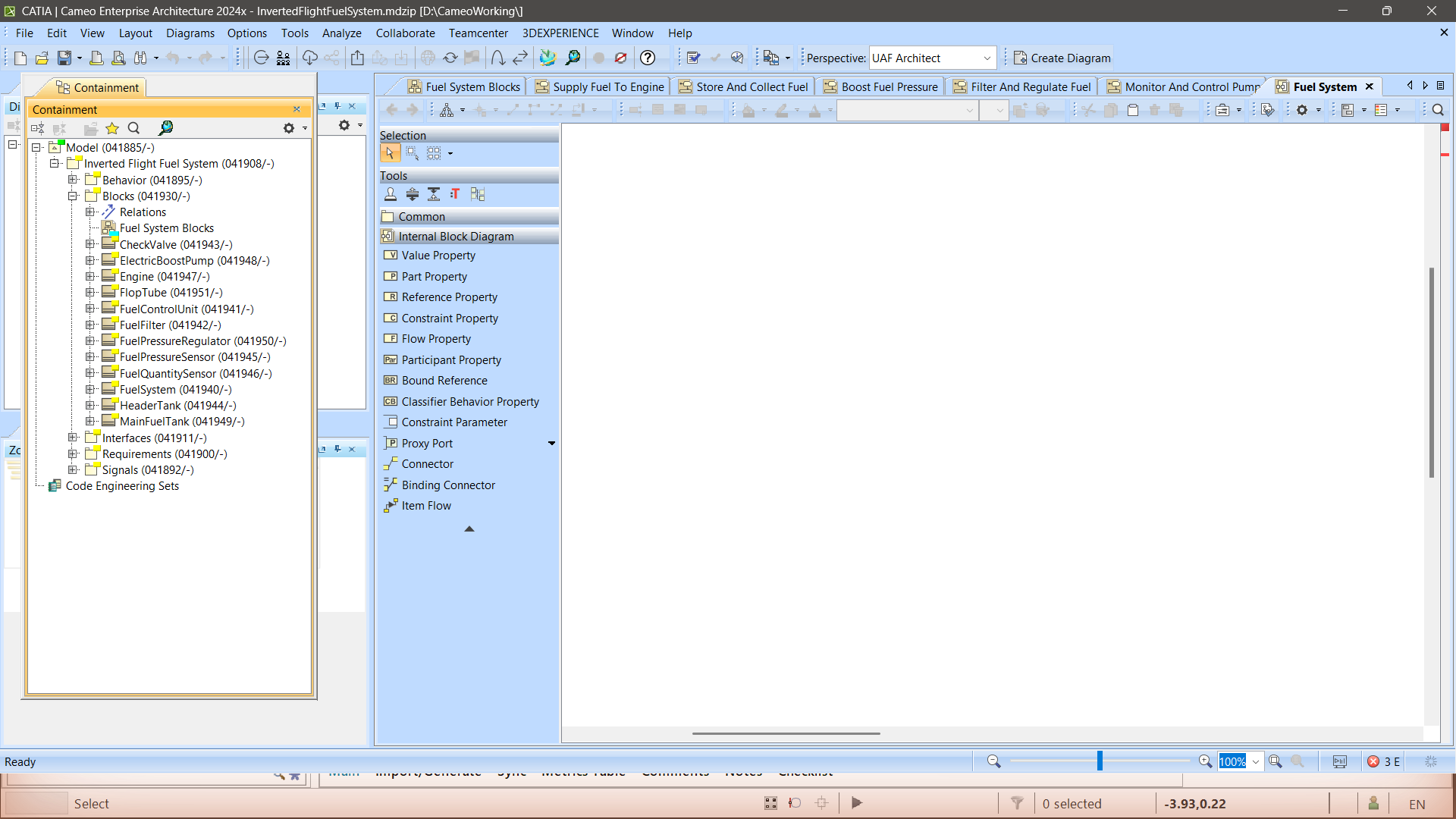
InvertedFlightFuelSystem.mdzip. Every element carries its Teamcenter id: the model root is 041908, Blocks is 041930, ElectricBoostPump is 041948. The TC_* stereotypes only attach after "Mark for Deep Synchronization" has been run once — on a brand-new project they are not there.The Internal Block Diagram is where the scoping rule comes from. Every proxy port is typed by an interface block, and conjugation marks the inputs:
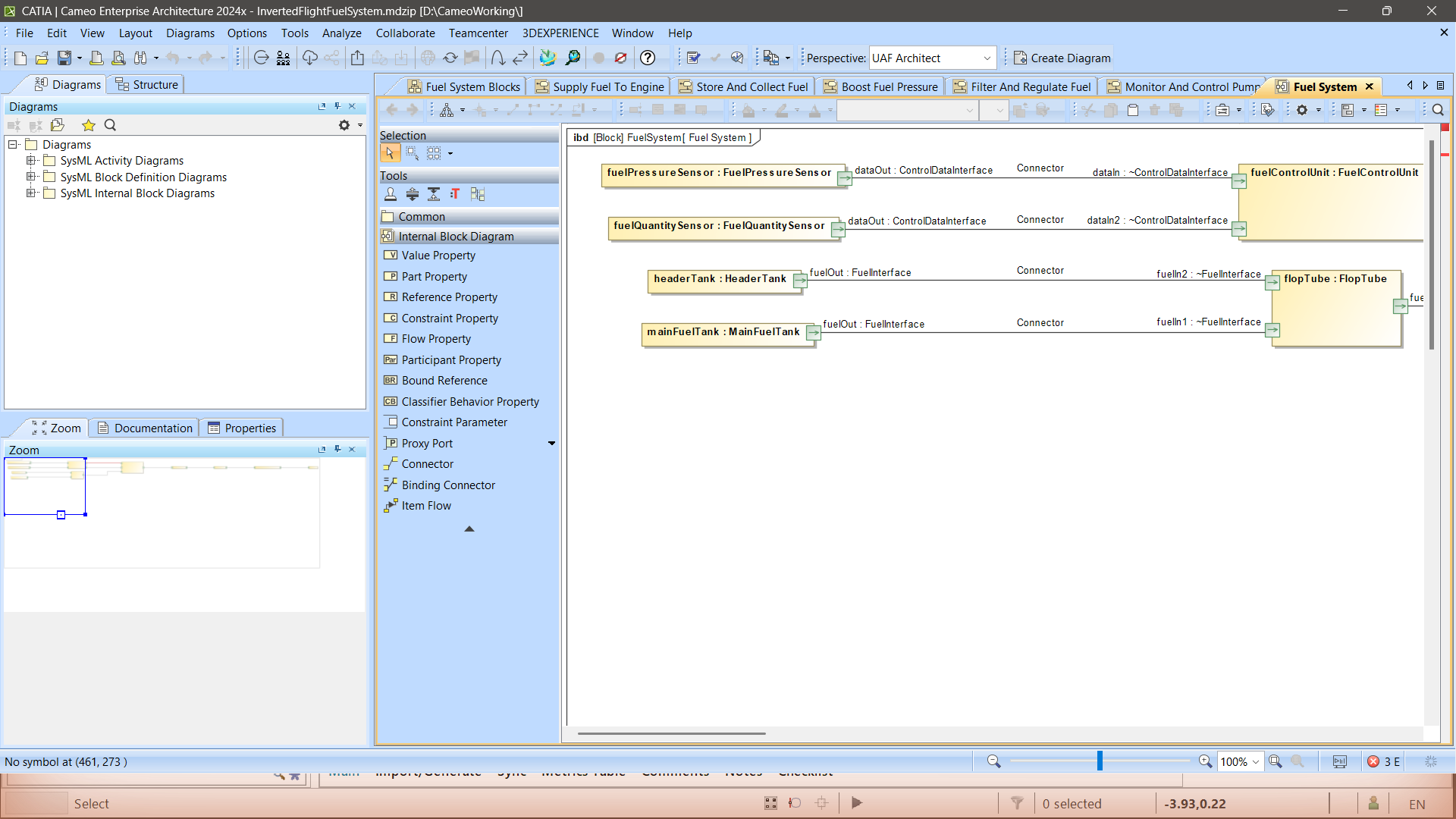
fuelOut : FuelInterface, dataOut : ControlDataInterface, and the conjugated form ~FuelInterface on the receiving side. All 22 ports are typed — this model passes the port-domain audit 22 of 22, which most models in the estate do not.2 · The master copy in Teamcenter
The push is the HCL Cameo–Teamcenter connector. Once it has run, Teamcenter holds the architecture as real business objects — Fnd0LogicalBlock components, Fnd0LogicIntrfce ports, Fnd0LogicConn connectors, Functionality functions — and from that point on Teamcenter is the thing every generator reads.
You can check the state of the model at any time. This is the merge guard reading the live tier and comparing it against the recorded clean-state baseline:
$ node bin/guard-tc-model.mjs --item 041908 --verify out/guard/041908.baseline.json

=== TC 041908: 49 objects, 29 ports, 11 connections

against out/guard/041908.baseline.json (taken 2026-08-01T18:02:06.291Z)
  added   : 0 objects, 0 ports, 0 wires
  changed : 0 objects, 0 ports
  REMOVED : 0 objects, 0 ports, 0 wires
  UNTYPED : 0 port(s) lost their interface

OK - nothing was removed. Merge-only holds.3 · The same model in Capital
One command turns the live Teamcenter read into an importable Capital project:
$ node bin/forward-translate.mjs --live 041908 \
      --project "Inverted Flight Fuel System" \
      --out out/capital/InvertedFlight.platform.xml

forward-translate ok {"out":"out/capital/InvertedFlight.platform.xml","bytes":524073,
  "components":12,"pathways":11,"pathways_skipped":0,"functions":16,"signals":6,
  "carriers":0,"allocations":0,"normalized":true}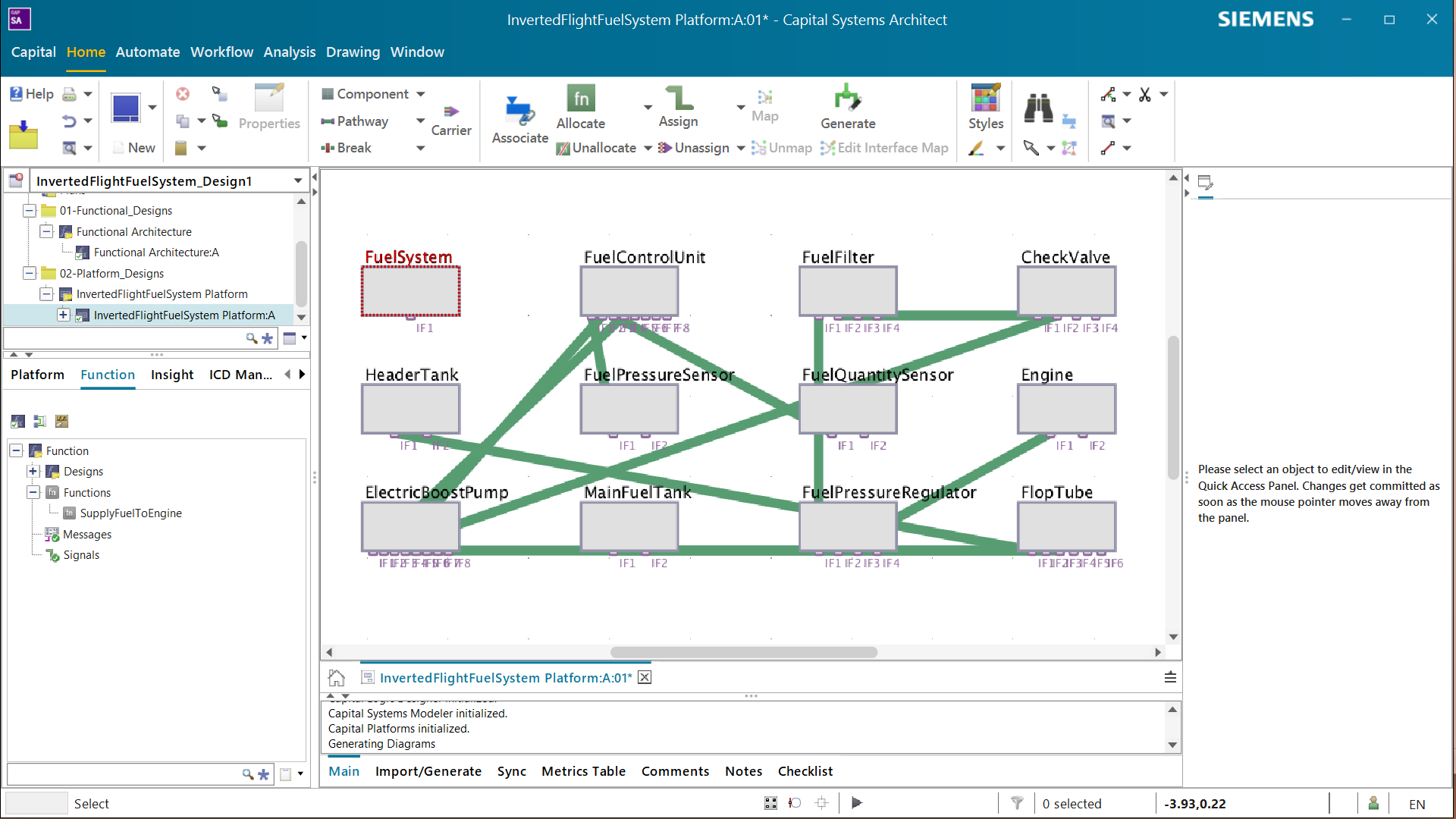
InvertedFlightFuelSystem Platform:A:01. All 12 components rendered, wired exactly to the Cameo connector topology. FuelSystem correctly shows no pathway line — it is the composite whole, not a connector endpoint; its 11 parts are.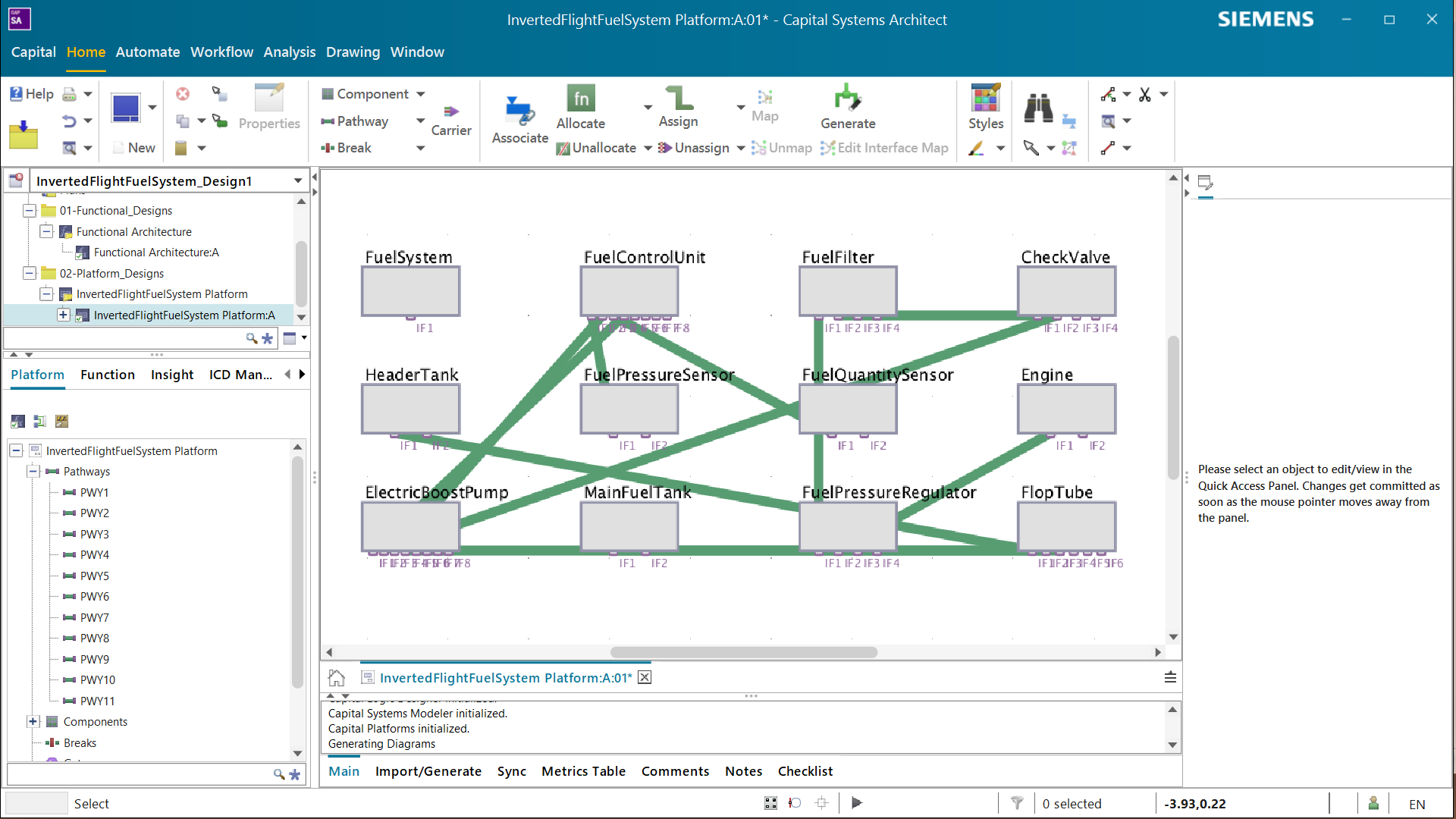
PWY1 … PWY11. Eleven pathways in, eleven pathways out, zero skipped.4 · The same model as an NX drawing
The fluid subset — chosen by port domain, not by name — becomes a real P&ID in NX Schematic Designer.
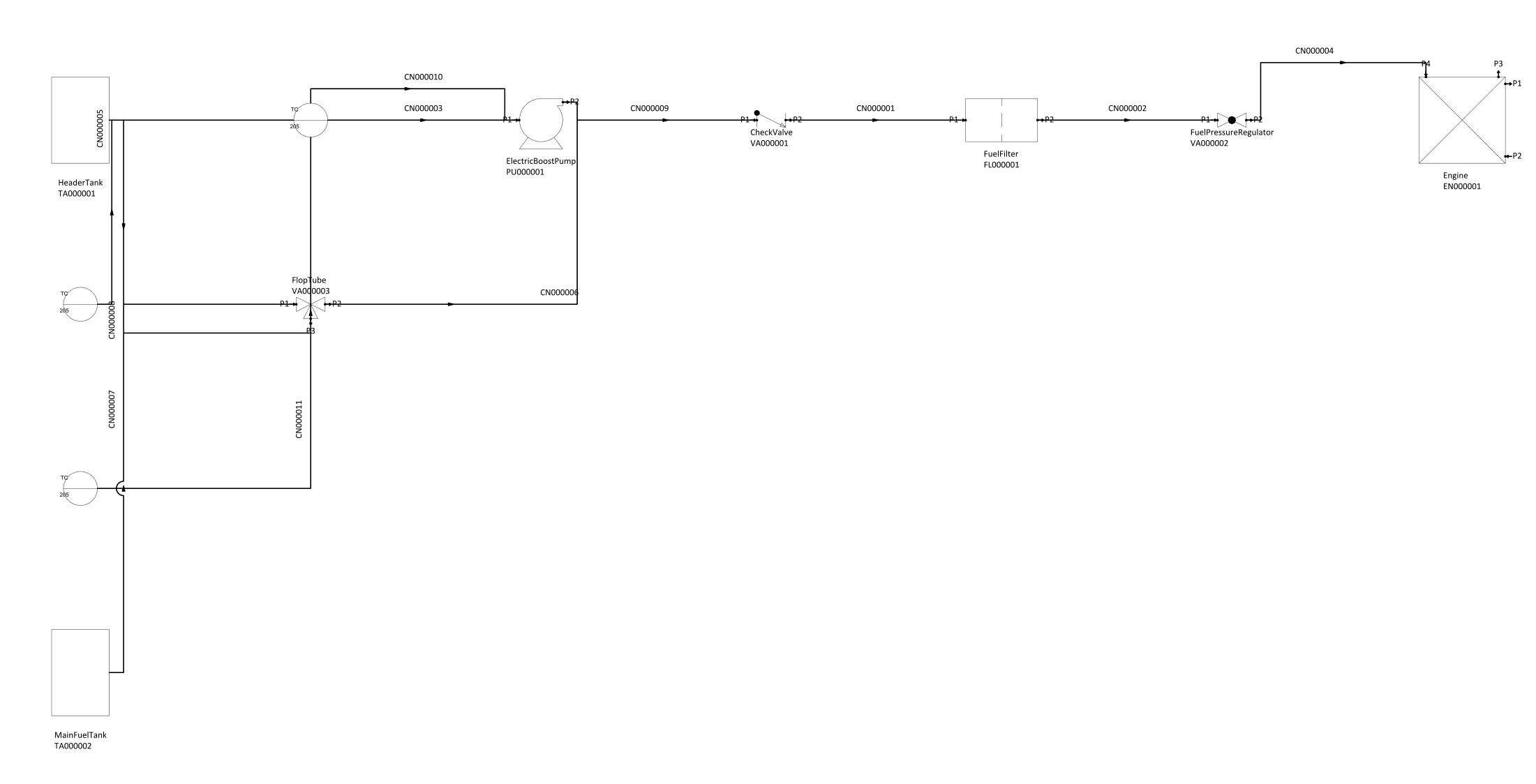
ElectricBoostPump / PU000001), so the drawing reads back to the model without a legend.
TC 041908. A drawing that cannot say which Teamcenter item it came from is not part of a digital thread.The full NX story — including why this is the one thing in the repo that cannot run headless — is on the NX Diagramming page.
5 · The same model as a reliability model
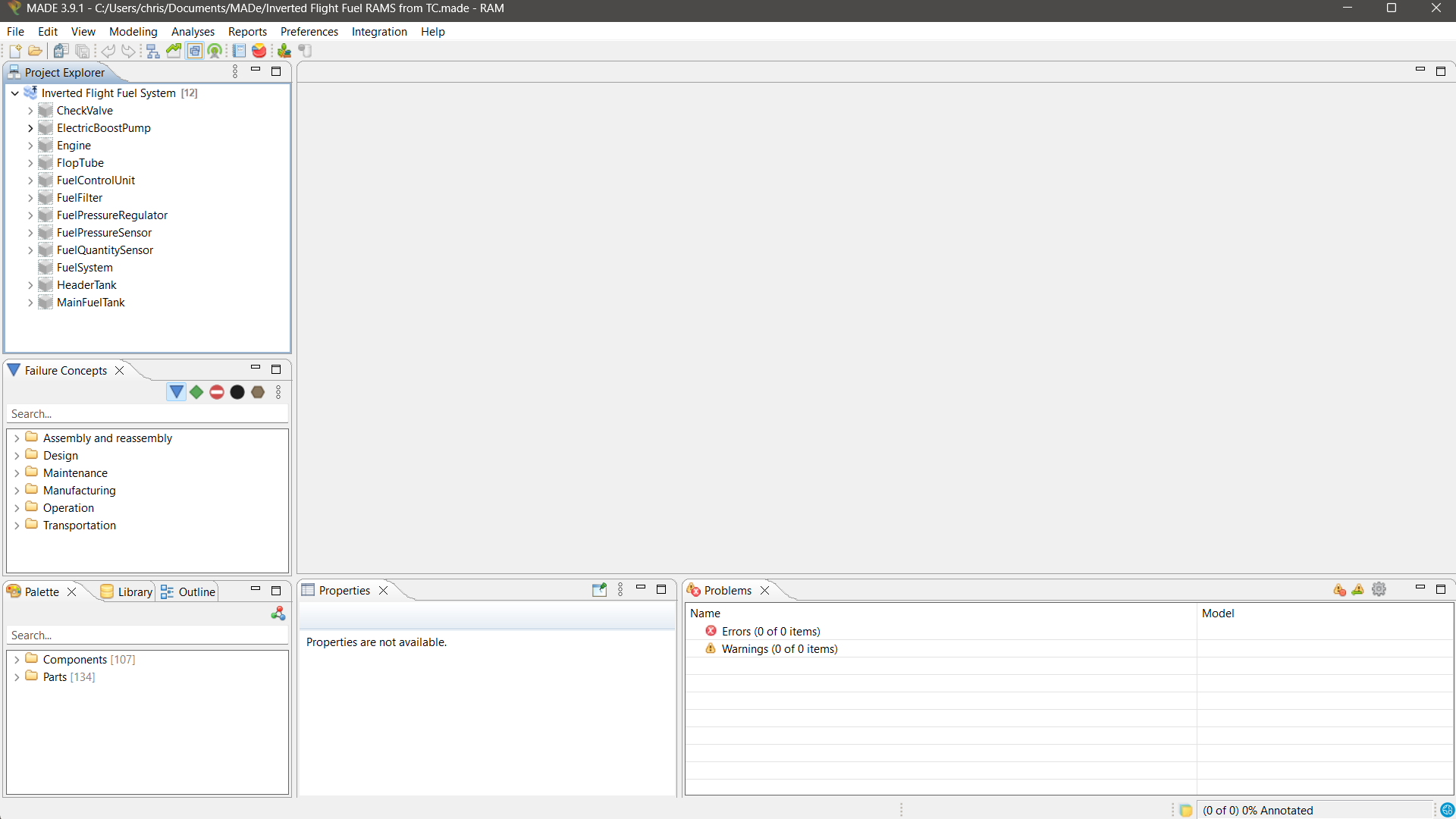
Inverted Flight Fuel RAMS from TC.made, imported live on 1 August 2026 through MADe's own Integration wizard: 12 components, 0 errors, 0 warnings. Nothing was hand-entered.The MADe page walks the whole wizard step by step, and is candid about what did not travel.
The hydraulic sibling — item 042326
The hydraulic architecture began life as a hand-authored reference bundle, so that the ISO 1219 discipline could be exercised. That left it in an honest but unsatisfying state: the platform tie check reported "no Teamcenter item behind this system — tied by the detail part alone".
It was then promoted into Teamcenter as its own model item — a new sibling, not an edit, because adding a hydraulic system to a package named "Inverted Flight Fuel System" would restructure a model that is not this tool's to restructure.
$ node bin/route-from-tc.mjs --item 042326

  DirectionalControlValve   fluid    -> nx-diagramming
  EngineDrivenHydraulicPump fluid    -> nx-diagramming
  HydraulicPressureSwitch   signal   -> capital, software
  HydraulicReservoir        fluid    -> nx-diagramming
  InvertedPickupSelector    fluid    -> nx-diagramming
  LandingGearActuator       fluid    -> nx-diagramming
  OilCooler                 fluid    -> nx-diagramming
  PressureFilter            fluid    -> nx-diagramming
  ReturnFilter              fluid    -> nx-diagramming
  SpeedbrakeActuator        fluid    -> nx-diagramming
  SuctionStrainer           fluid    -> nx-diagramming
  SystemAccumulator         fluid    -> nx-diagramming
  SystemPressureReliefValve fluid    -> nx-diagramming

  ports typed via Seg0Implements: 27   untyped: 0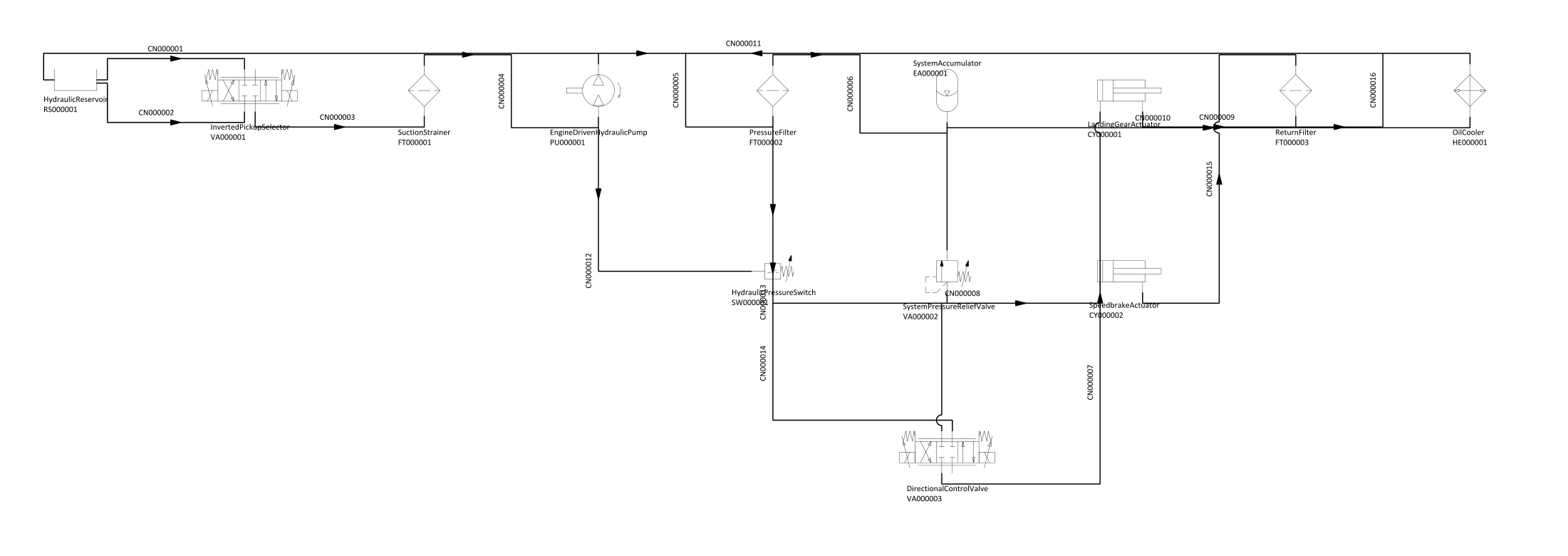
Seg0Implements. So the promotion tool refuses a bundle with no interfaces or any untyped port. Two interfaces were declared, HydraulicInterface was registered as fluid rather than as a domain of its own (a new "hydraulic" domain would route nowhere until the routing table learned about it), and six ports were renamed so each name carries its interface's token. All 27 now agree.Reproduce every figure on this site
# the Capital project XML, from a live Teamcenter read
node bin/forward-translate.mjs --live 041908 --project "Inverted Flight Fuel System" \
     --out out/capital/InvertedFlight.platform.xml

# the routing table, from Teamcenter alone
node bin/route-from-tc.mjs --item 041908
node bin/route-from-tc.mjs --item 042326

# the NX build spec, then the drawing itself (interactive NX session)
node bin/forward-to-nx.mjs --bundle out/nx/InvertedFlight.exchange.json \
     --out out/nx/InvertedFlight.nxspec.json --title "Inverted Flight Fuel System" \
     --out-part "D:\NXWorking\InvertedFlight\InvertedFlightFuelSystem_PID.prt"
bash tools/nx/run-nx-schematic.sh out/nx/InvertedFlight.nxspec.json out/nx/InvertedFlight.nxresult.json

# the MADe payload
node bin/forward-to-made.mjs --bundle out/live/InvertedFlightFuel.exchange.json \
     --project "Inverted Flight Fuel System" --root-item-id 041908 \
     --out out/made/InvertedFlightFuel.made.json

# the state of the model, before and after anything
node bin/guard-tc-model.mjs --item 041908 --verify out/guard/041908.baseline.json